Features
Everything CareHub does, in detail.
Twelve modules covering compliance, care delivery, people and money. This page goes through each one properly, including how it behaves day to day, so you can do your research before you ever speak to us.
Works where your team already works
CareHub lives inside Microsoft Teams.
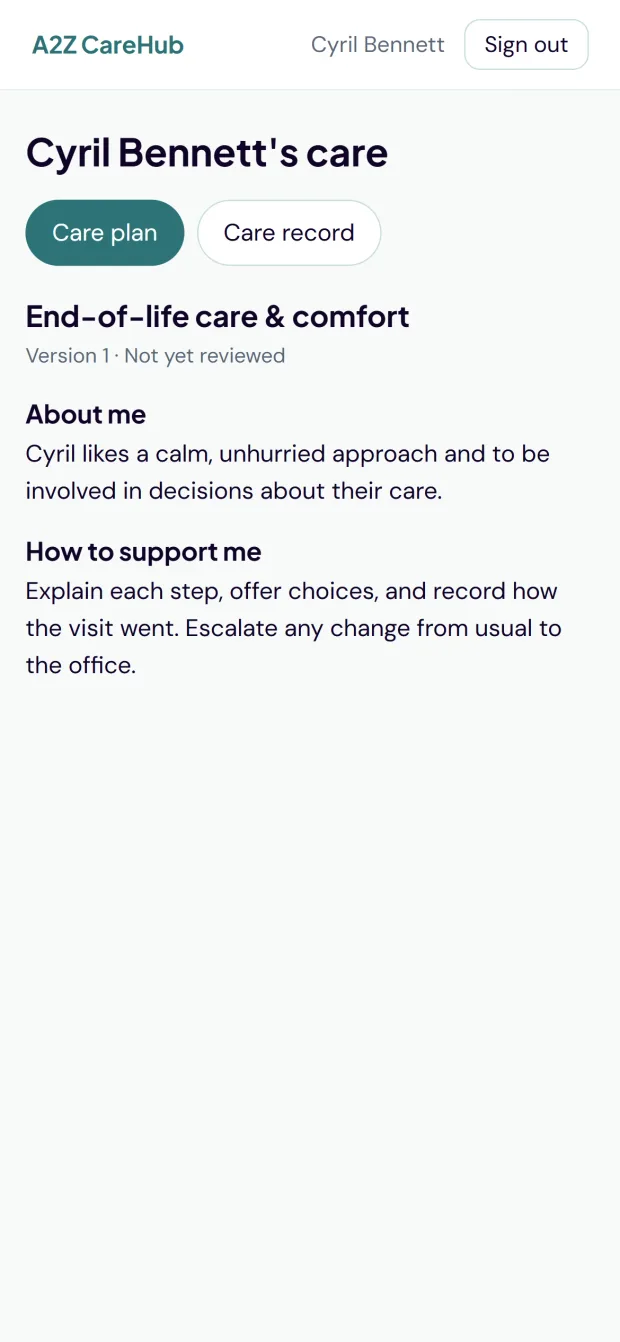
Your carers and managers don't need another app, another password or another icon on the home screen. CareHub runs as a tab inside Microsoft Teams, signs people in with the account they already have and works on the phones they already carry. Prefer a browser? The same product runs at a2zcarehub.co.uk with nothing lost either way.
For carers, on their phone
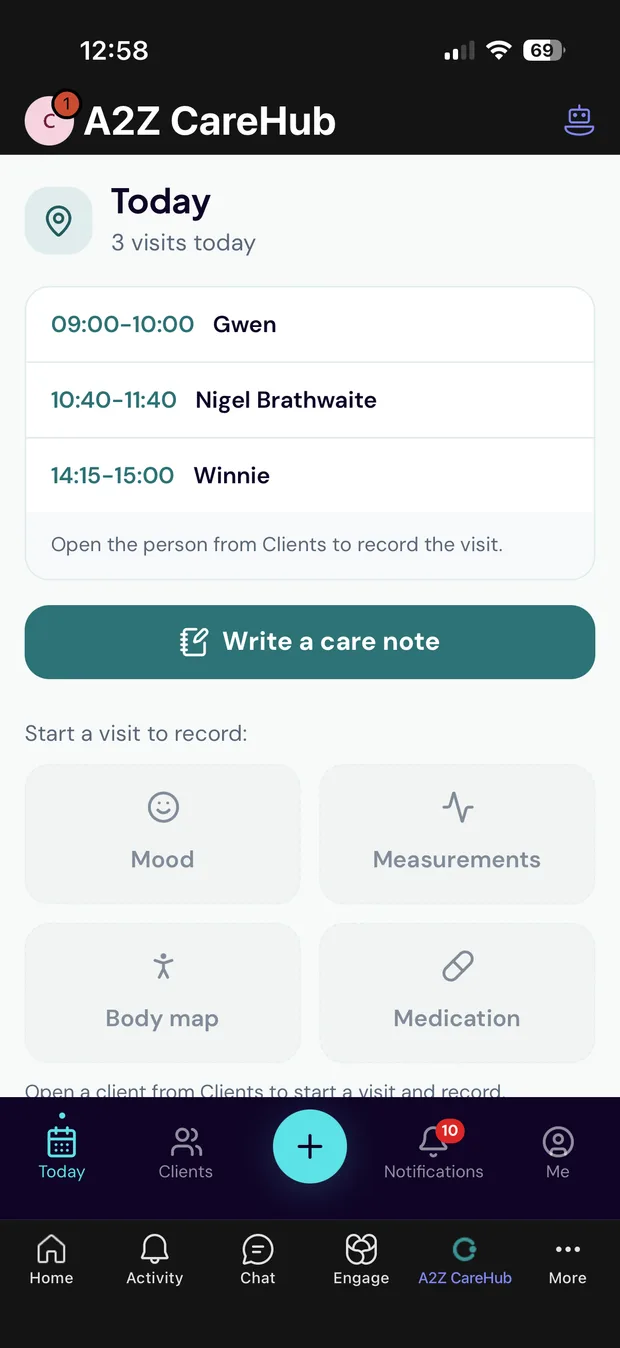
Today's visits, their clients, quick incident logging, care notes with AI feedback, medication rounds, their own leave, payslips and documents. A new policy arrives as a Teams message and one tap on it records that they have read it. All inside Teams, designed for a phone screen and a busy shift.
For managers, wherever they are
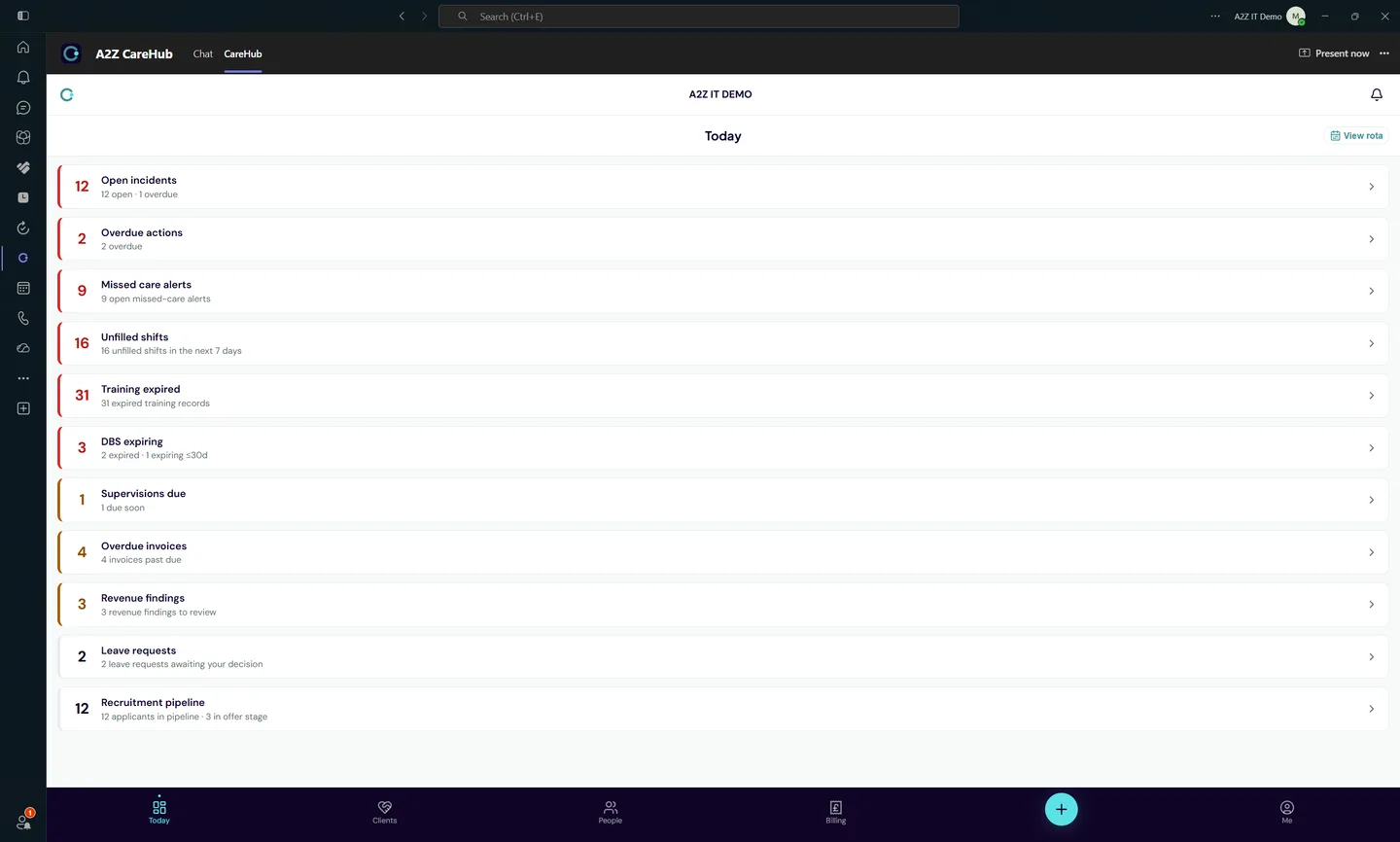
A Today view of what needs attention, staff records and quick actions for logging incidents or supervision notes. Alerts land as Teams chat messages that link straight to the record: a missed medication, a new incident, a leave request waiting for a decision. You deal with it in the same app, no laptop needed.
No rollout project
Teams sign-in means no new passwords to issue and no separate accounts to manage. Notifications need no extra Microsoft permissions either. If your organisation runs Microsoft 365, your team is already set up.
Switching from another system?
Bring your people with you. Export your service users and staff from your current system as a CSV file, match the columns to CareHub on screen and import them in one pass. A check step shows exactly what will happen row by row before anything is created. Incomplete records arrive as drafts to finish rather than blocking the import.
Connected intelligence
AI that knows your organisation, not just the sector.
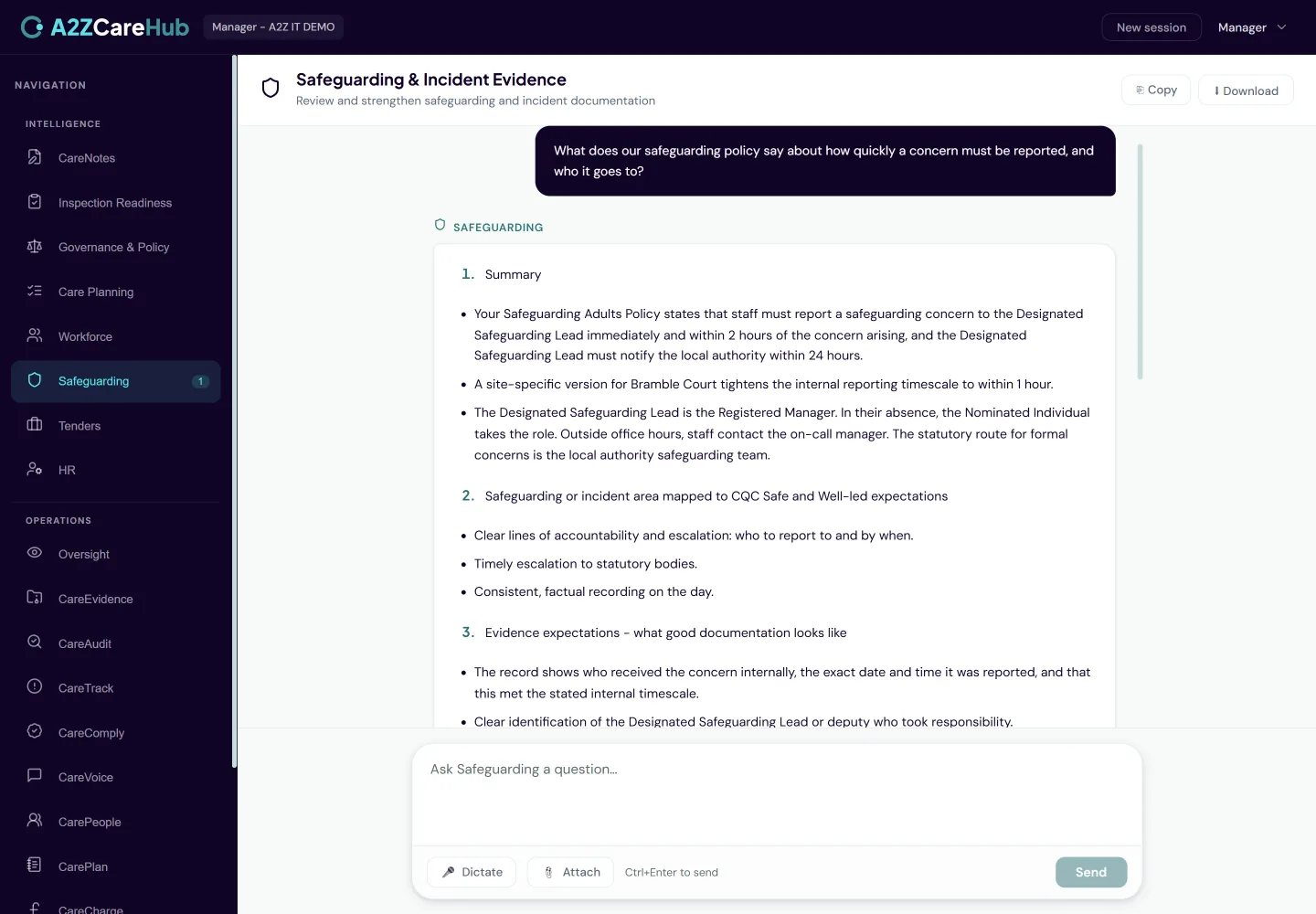
CareHub reads the policies and procedures you already hold, whether they were uploaded to CareHub, live in your Microsoft 365 SharePoint, or sit in your Google Workspace Shared Drives. Its agents quote them back word for word and name the document they came from: ask what your safeguarding policy says about reporting a concern and the answer comes from your policy. The other half is your live data. The Inspection Readiness agent knows your audit scores and the Workforce agent knows your training gaps, so every answer is about your organisation rather than a sector average.
Openness by design
The record can be shared with the person it's about.
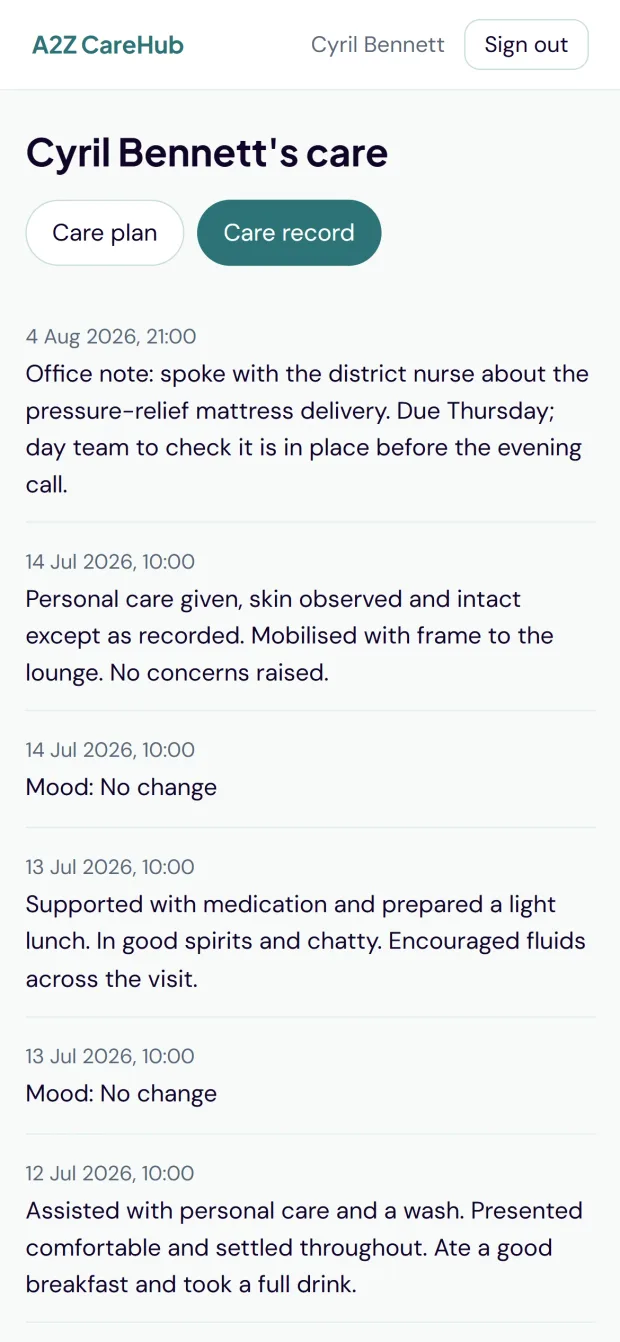
The person receiving care, or a family member with the authority to act for them, can be invited to read their own care plan and care record. Visiting professionals such as District Nurses can be given time-limited access to read the clinical record and add their own entries, attributed to them and never editable afterwards. Every view of the record is logged, and the Registered Manager can see exactly who has looked at what.
The questions you get asked
The reports you get asked for, without the compiling.
A reports page spanning the whole platform, each report a spreadsheet you download in one click: contact lists for your service users, their next of kin and your staff; care plan review status with overdue plans and unresolved review triggers; a medication administration summary per person and per medicine; missed and refused care with what was done about each one and how it was closed; the training compliance matrix; and a record access log showing who opened which care record, when and from which screen.
Every report is built from live data at the moment you press download, so there is nothing to prepare in advance and nothing to keep up to date. The page lists exactly the reports you are allowed to run, because it asks the same permission question the download itself asks. The record access log is restricted to the Nominated Individual, Registered Manager, Directors and Owners, and neither carers nor read-only reviewers can export a bulk list at all: downloading everyone's details is a different act from reading one record on screen.
Compliance & quality: eight modules
The CQC side of the platform: evidence, governance, audits, surveys, policies and the AI that ties them together.
A2Z CareNotes
Better care notes, written faster
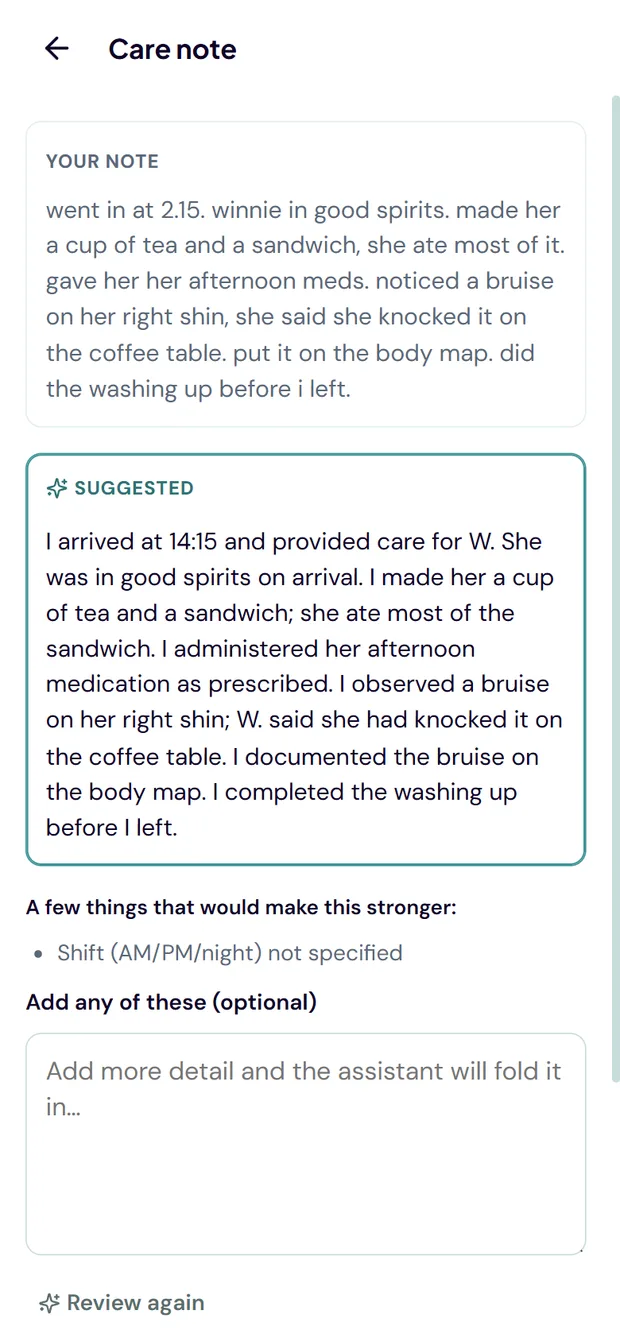
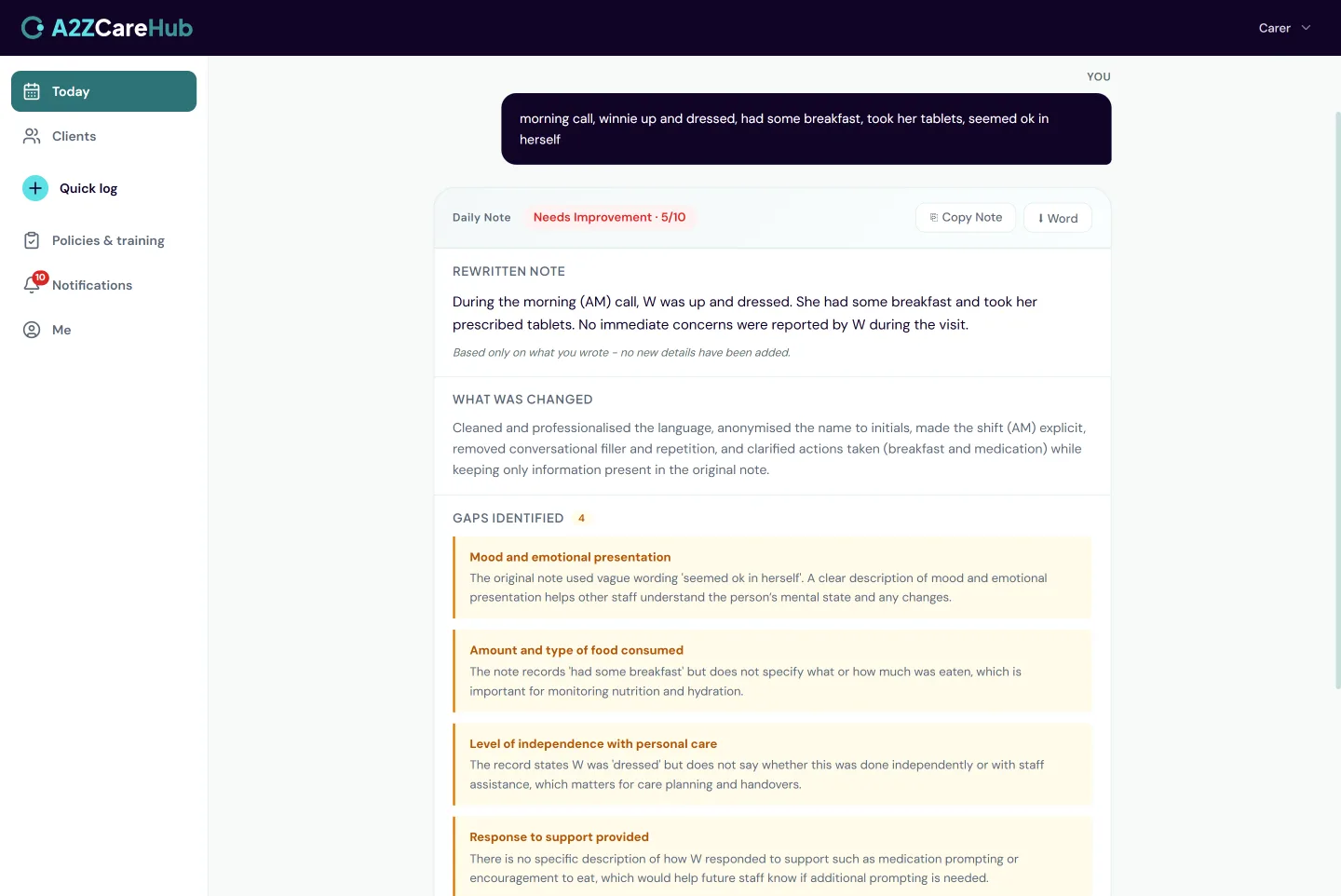
Carers type or dictate a note on any device and get structured feedback against CQC criteria in seconds. The AI suggests a stronger version; the carer stays in control of what's saved.
What's included
- Type or dictate notes on any device, in Teams or a browser
- Instant structured feedback against CQC criteria
- An AI-suggested rewrite shown alongside the original
- Up to three follow-up questions where detail is missing
- Organisation-specific guidance built into the feedback
How it behaves day to day
- The carer always chooses: keep mine, use the suggestion or edit it first. The AI never overwrites anyone’s words
- If the AI is ever unavailable, the carer saves their note as written. Recording care is never blocked
- An "add detail and review again" loop lets a carer improve a note iteratively in under a minute
- When a note is already strong, it says so plainly rather than inventing changes
A2Z CareIQ
Seven AI agents for the office
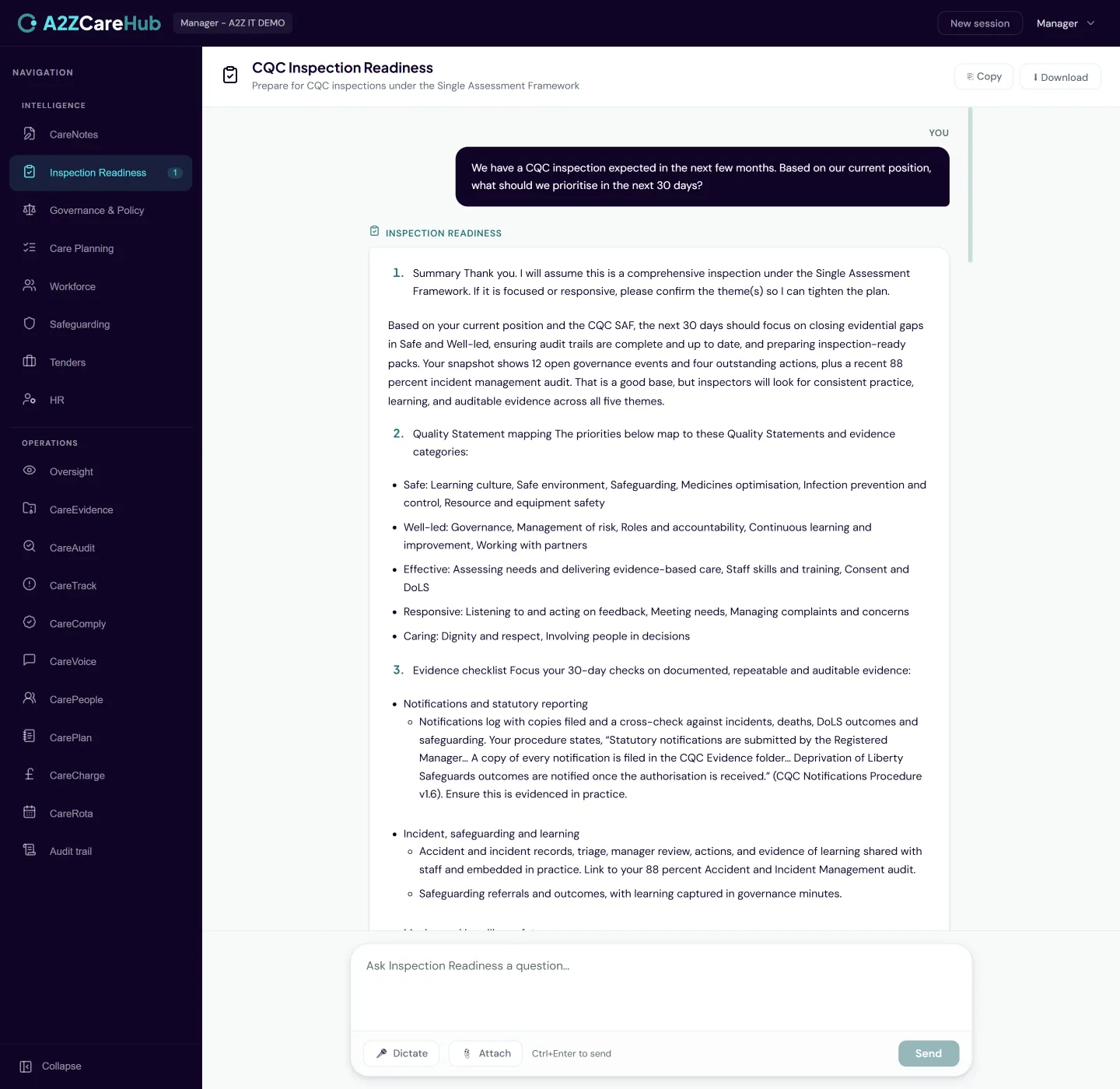
A panel of specialist AI agents for Registered Managers, Nominated Individuals and back office staff: CQC Inspection Readiness, Governance and Policy, Care Planning Quality, Workforce Capability, Safeguarding and Incident Evidence, Tenders and Commissioning plus HR.
What's included
- Seven specialist agents, each grounded in sector guidance
- Points you to the policies and documents you already hold
- Aware of your live governance data where relevant
- Export any answer straight to a Word document
- Per-user access control over who can use which agent
How it behaves day to day
- Conversations are not stored. Each session starts clean, which keeps sensitive queries out of any database
- Ask the Tenders agent to structure a PQQ response, or the inspection agent what evidence a Quality Statement needs. The answers are organisation-specific
- The Word export produces a properly formatted document, not a copy-paste of chat text
A2Z Oversight
Your governance position, live
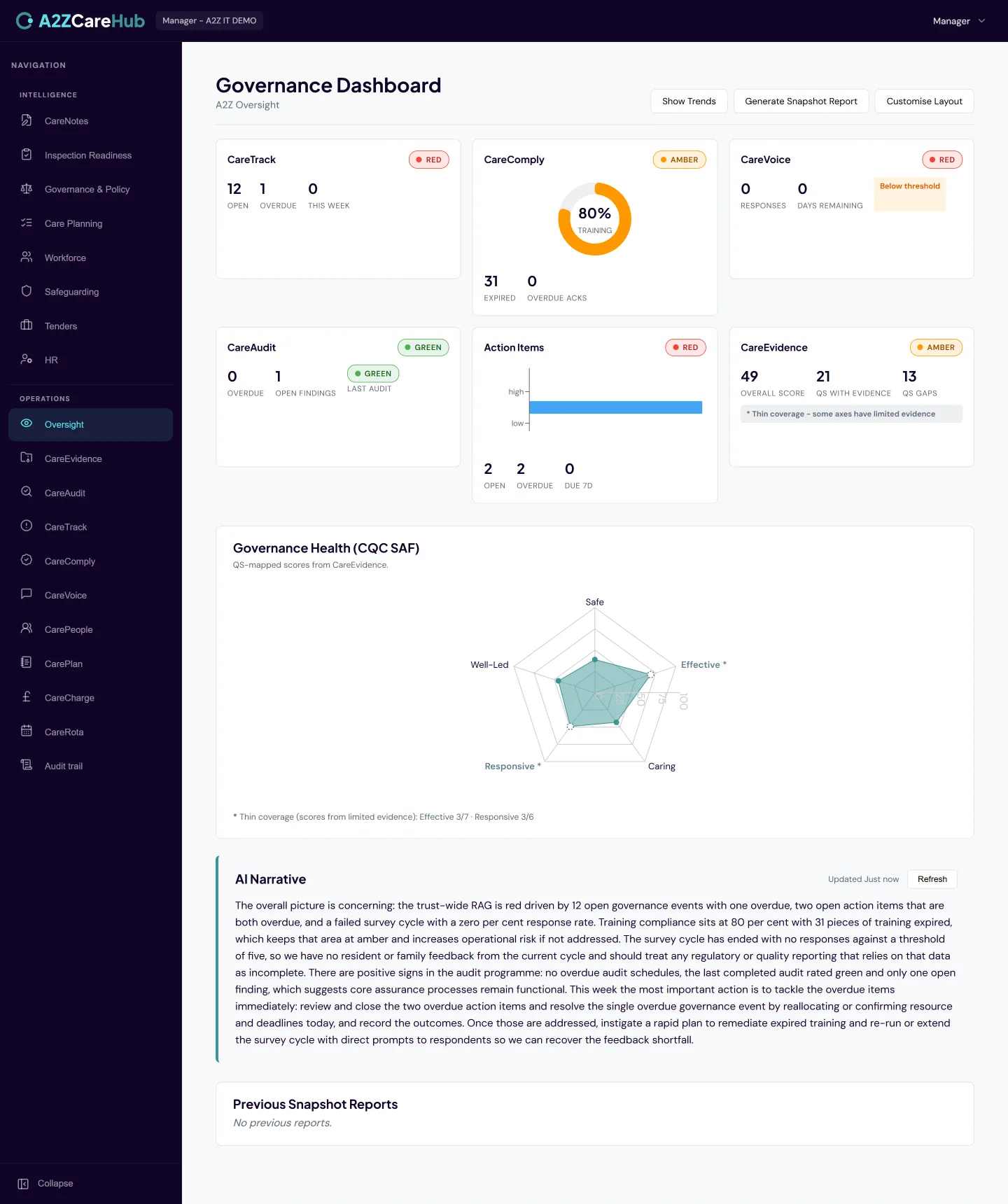
The dashboard for NIs and RMs: Accidents, Incidents, Complaints, Safeguarding Referrals, Audits and Action Plans in one real-time view, with trends over time and an AI narrative that explains what’s moving.
What's included
- A live Today view of open governance items needing attention
- Consolidated position across Incidents, Complaints, Safeguarding, Audits and Actions
- A governance health radar across the five CQC key questions
- Monthly trend snapshots so direction of travel is visible
- An AI-written narrative summary you can refresh on demand
How it behaves day to day
- The radar is driven by real tagged evidence from across the platform, not a self-assessment questionnaire
- Thin evidence is flagged honestly: an area with little data says so instead of pretending to a score
- Trend snapshots are taken automatically at month end with no one having to remember
A2Z CareTrack
Governance events, captured properly
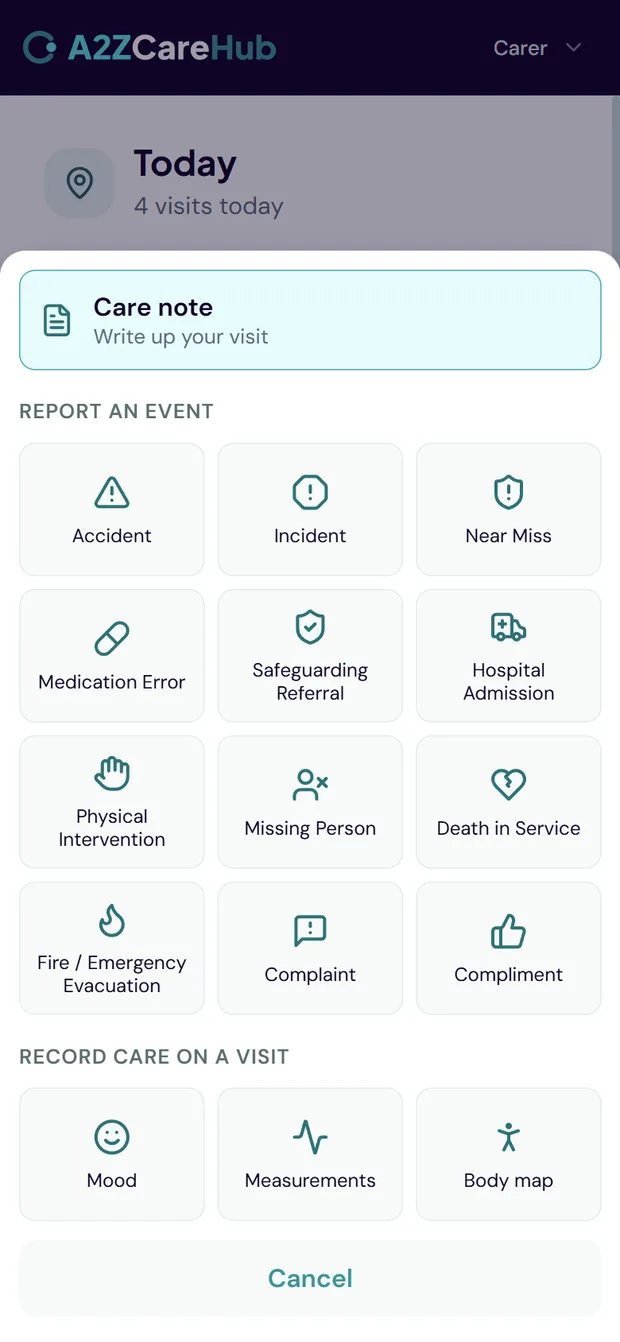
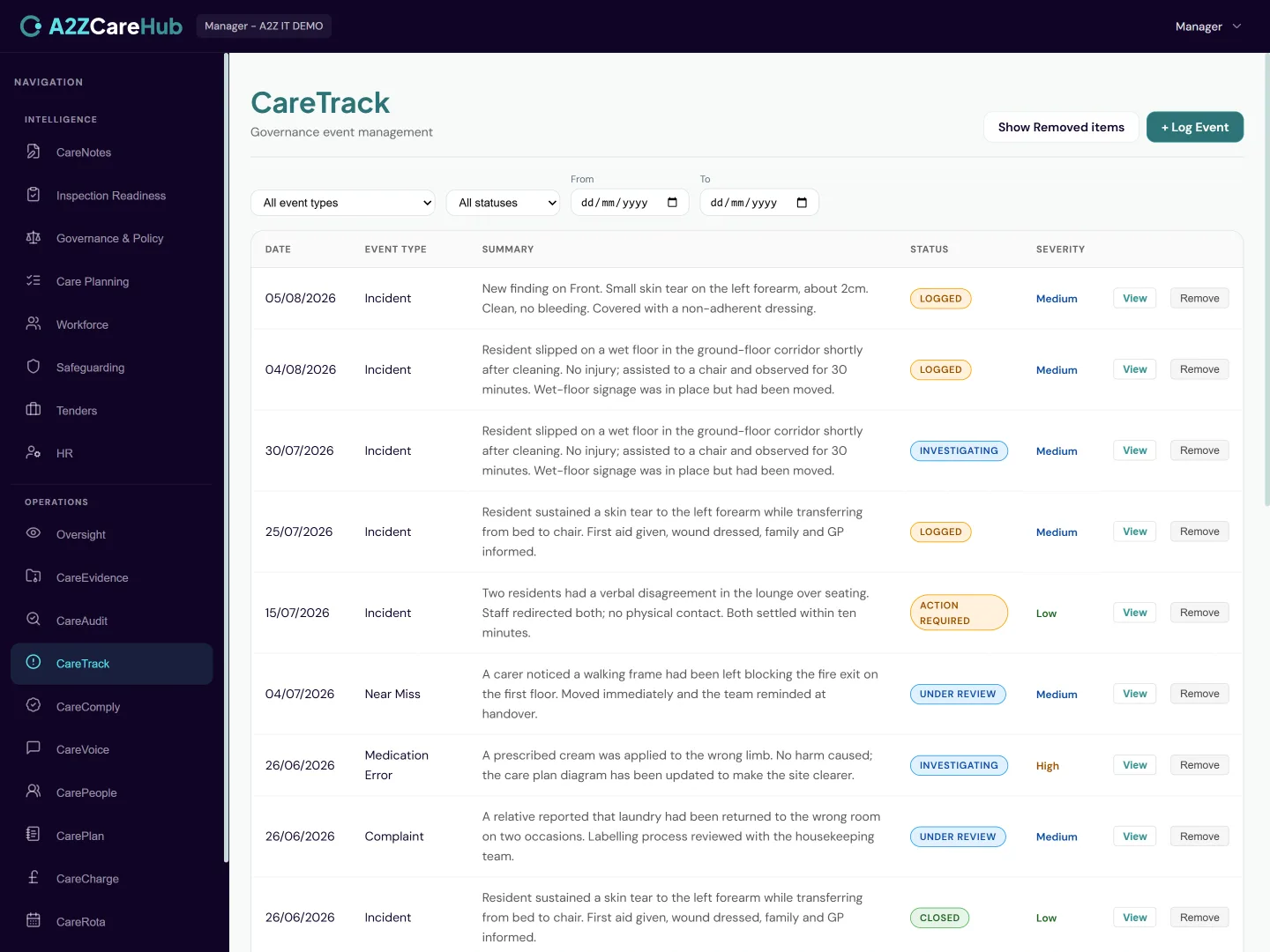
Native forms for Accidents, Incidents, Complaints and Safeguarding Referrals, on any device. Everything captured feeds Oversight and the CareIQ agents. Every event can carry actions, notes and attachments through to resolution.
What's included
- Structured capture for Accidents, Incidents, Complaints and Safeguarding
- Quick-log from a carer’s phone in Teams, moments after something happens
- Action items with owners, due dates and automatic notifications
- Notes and file attachments on every event
- An event intelligence agent to help managers think an incident through
How it behaves day to day
- A carer logs an incident in under a minute; the manager is notified immediately with a link straight to it
- Assigned actions chase themselves: the owner gets notified and open items stay visible on Oversight until closed
- The Teams notification takes a manager straight to the incident, phone or desktop, no laptop needed
A2Z CareVoice
Anonymous feedback that runs itself
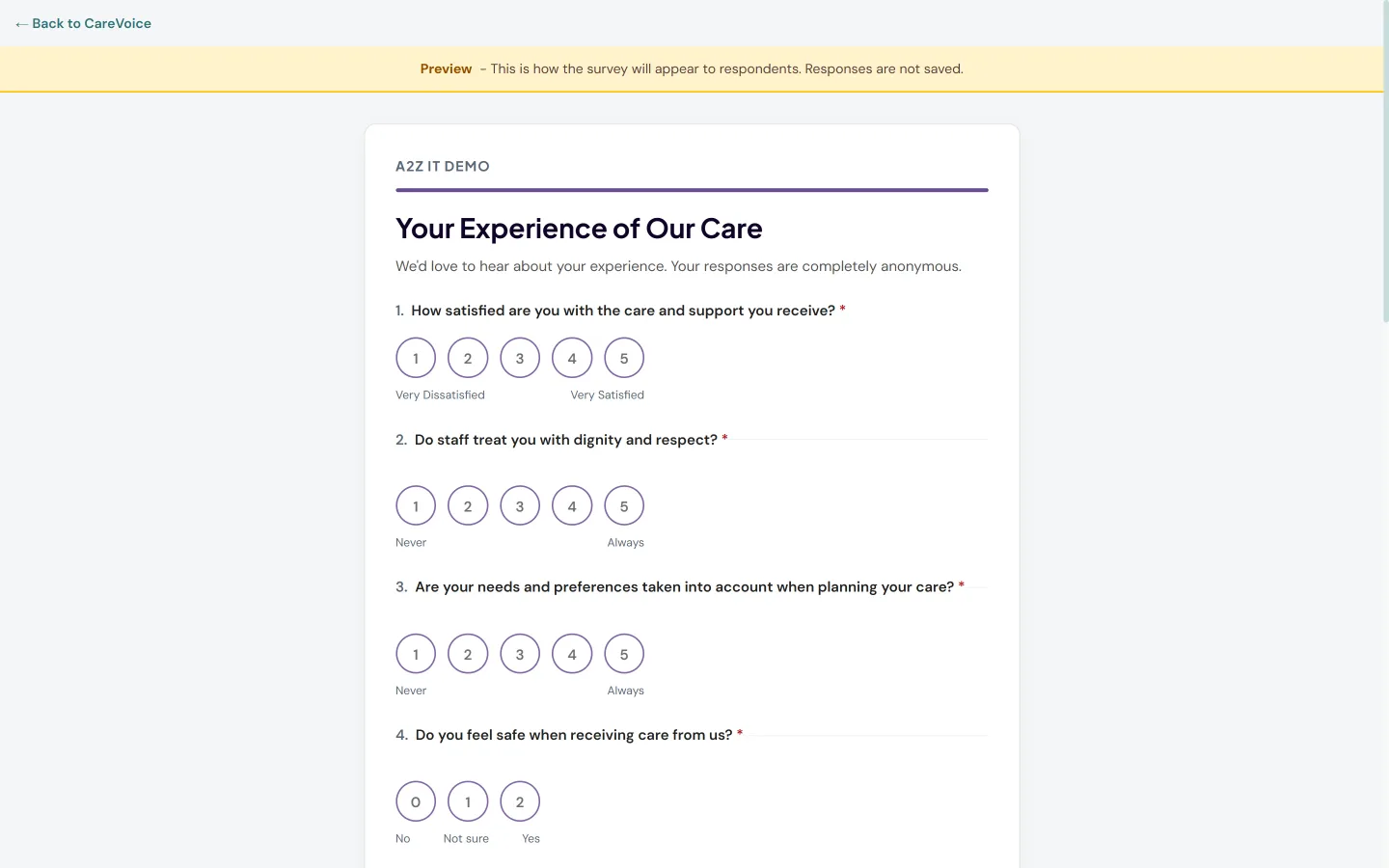
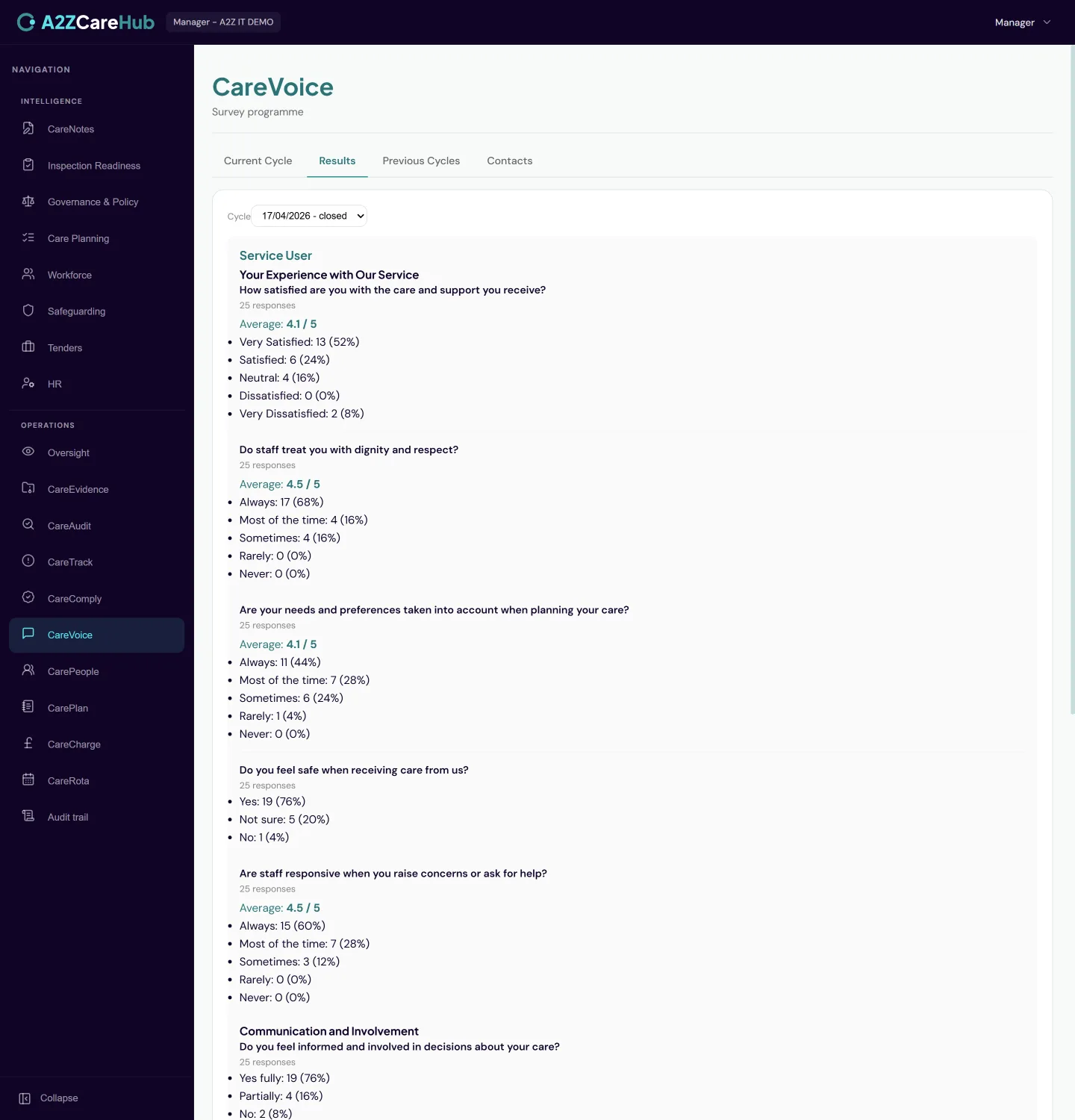
A 6-monthly survey programme for service users, families and carers that runs automatically each cycle. Genuinely anonymous, branded to your organisation and fed straight into your governance reporting.
What's included
- Automatic 6-monthly cycles for service users, families and carers
- Public survey links that need no login or app
- QR codes for printed handouts and noticeboards
- Your logo and colours on the survey itself
- AI analysis of free-text answers alongside the scores
How it behaves day to day
- Anonymity is structural: responses cannot be traced to an individual and the platform will not surface per-carer results anywhere
- Cycles open and close themselves. Nobody has to remember to run the survey
- Results land in Oversight and inform the CareIQ agents, so feedback actually reaches your governance evidence
A2Z CareComply
Policies acknowledged, training current
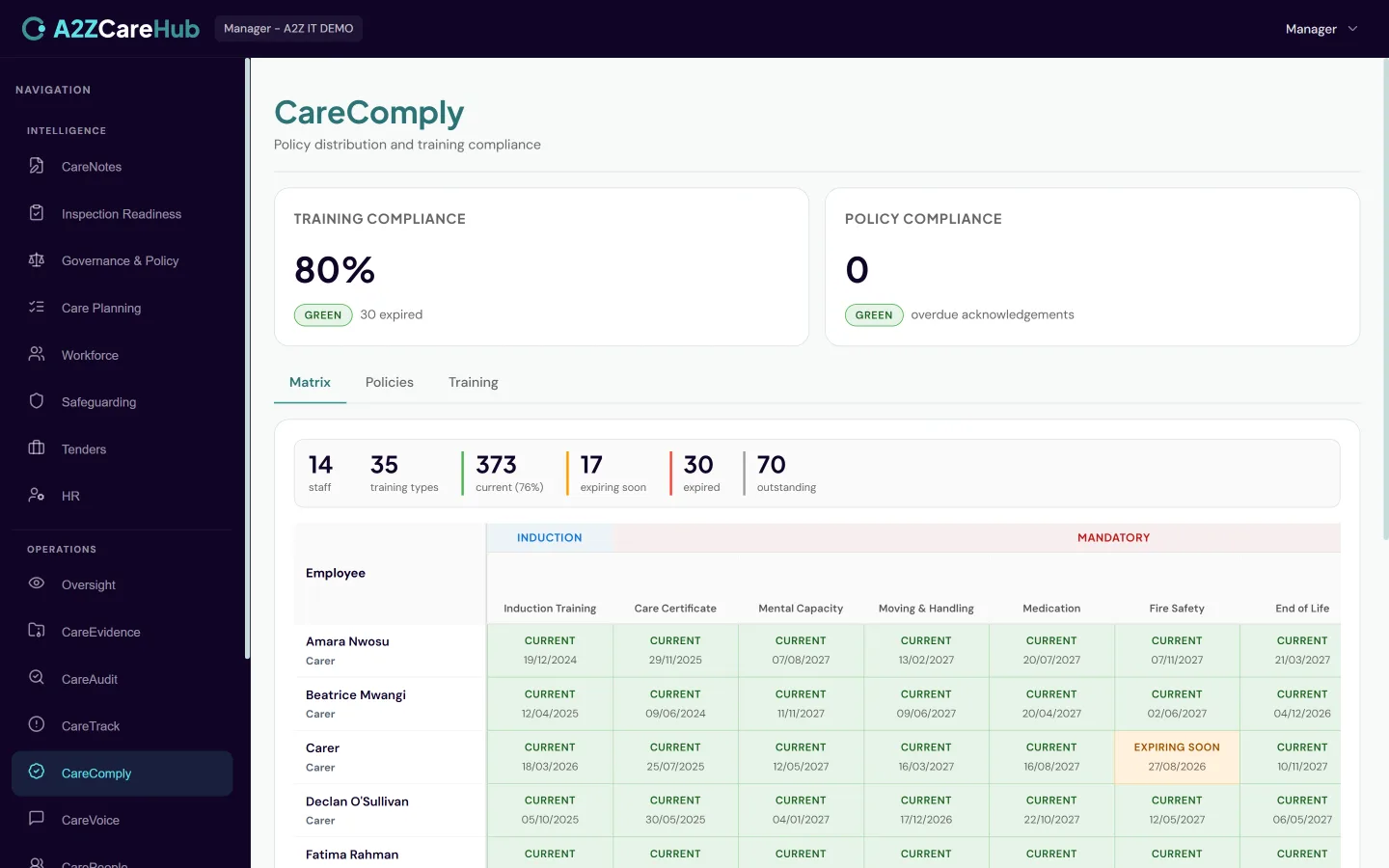
Policy distribution with acknowledgement tracking, alongside a training compliance matrix that keeps expiry dates in front of you. Multi-stage automatic reminders and a defensible audit trail for inspection.
What's included
- Distribute policies to named staff and track who has acknowledged
- A training matrix across the whole team, sorted expiry-first
- Certificate upload against training records
- Staged automatic reminders that escalate as deadlines approach
- A complete audit trail of every acknowledgement
- An asset register for care equipment and IT, with LOLER examinations, servicing and PAT tests scheduled and a reminder before each one falls due
How it behaves day to day
- Carers read the policy and confirm "I have read this" from their phone; the acknowledgement is timestamped against the exact version
- The training view leads with what’s expired or expiring, so the risk is always at the top of the list
- Staff see their own policy and training position in Teams without asking the office
- Hoists, slings and stand aids get a six-monthly LOLER schedule the moment they are added, so the statutory examination is never left to memory
- Inspection certificates are kept against each item, and IT that has reached its end of support is listed in one place, ready for DSPT and Cyber Essentials
A2Z CareAudit
Audits that produce action, not paperwork
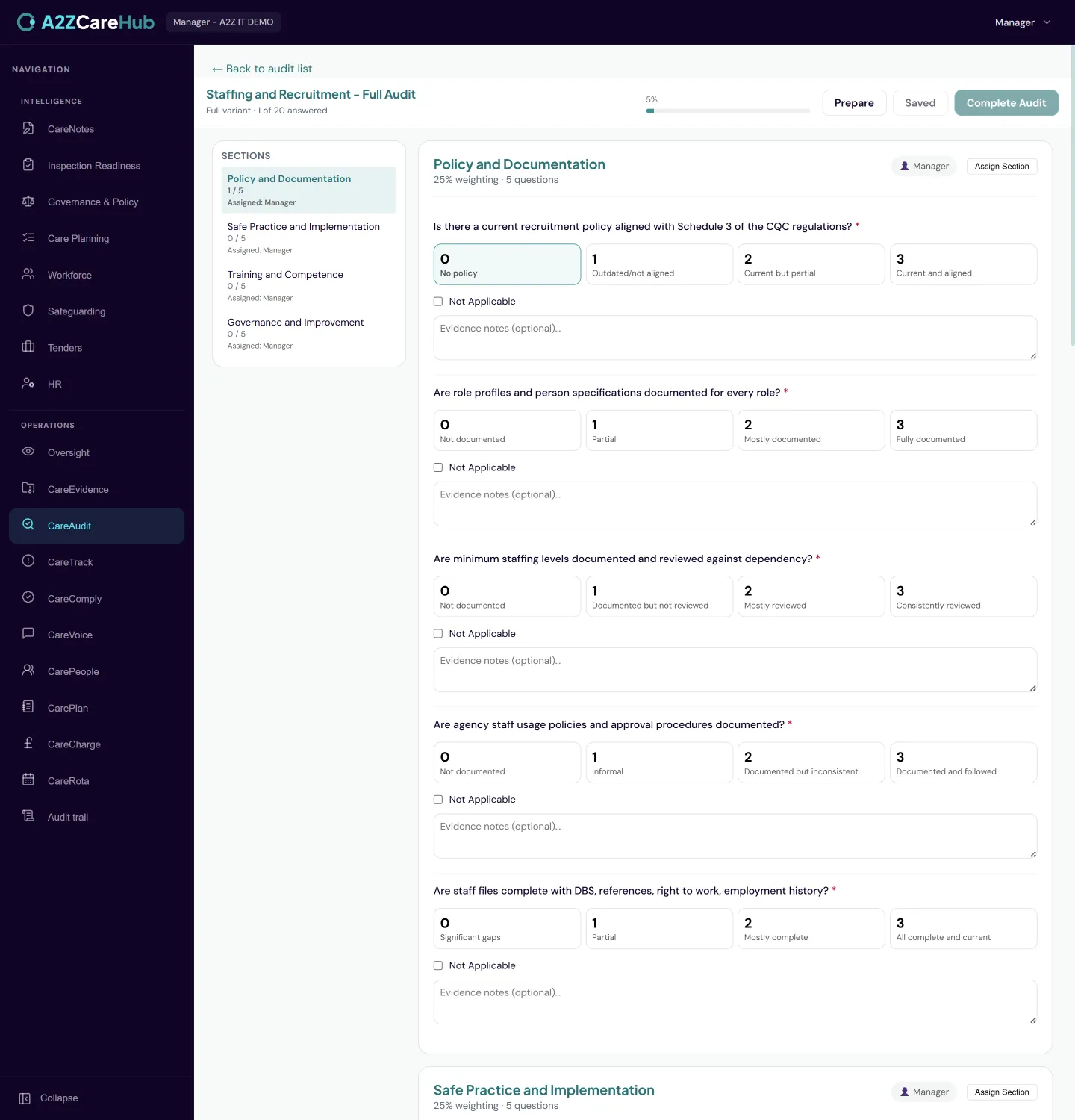
Run audits against CQC-aligned templates for your setting type, with built-in scoring, action plans and three embedded AI agents to help with preparation, finding narration and remediation.
What's included
- CQC-aligned audit templates per setting type
- Built-in scoring with section-level assignment to staff
- Action plans generated from findings, with owners and due dates
- Three embedded agents: audit preparation, finding narration and remediation drafting
- Results feed Oversight and your evidence portfolio automatically
- Manager sign-off on completed audits, recorded with name, date and notes
How it behaves day to day
- Sections can be assigned to different staff, each notified with what’s theirs to complete
- The narration agent turns a raw finding into inspection-ready wording a manager can edit rather than write from scratch
- Action items from audits land in the same tracked action system as incidents, so nothing lives in a separate spreadsheet
- Half-finished audits are protected: navigating away with unsaved answers prompts before anything is lost
- A completed audit can be counter-signed by a manager, and you choose who can sign off. The sign-off is permanent and the scores stay exactly as they were at completion
A2Z CareEvidence
Your inspection evidence, already organised
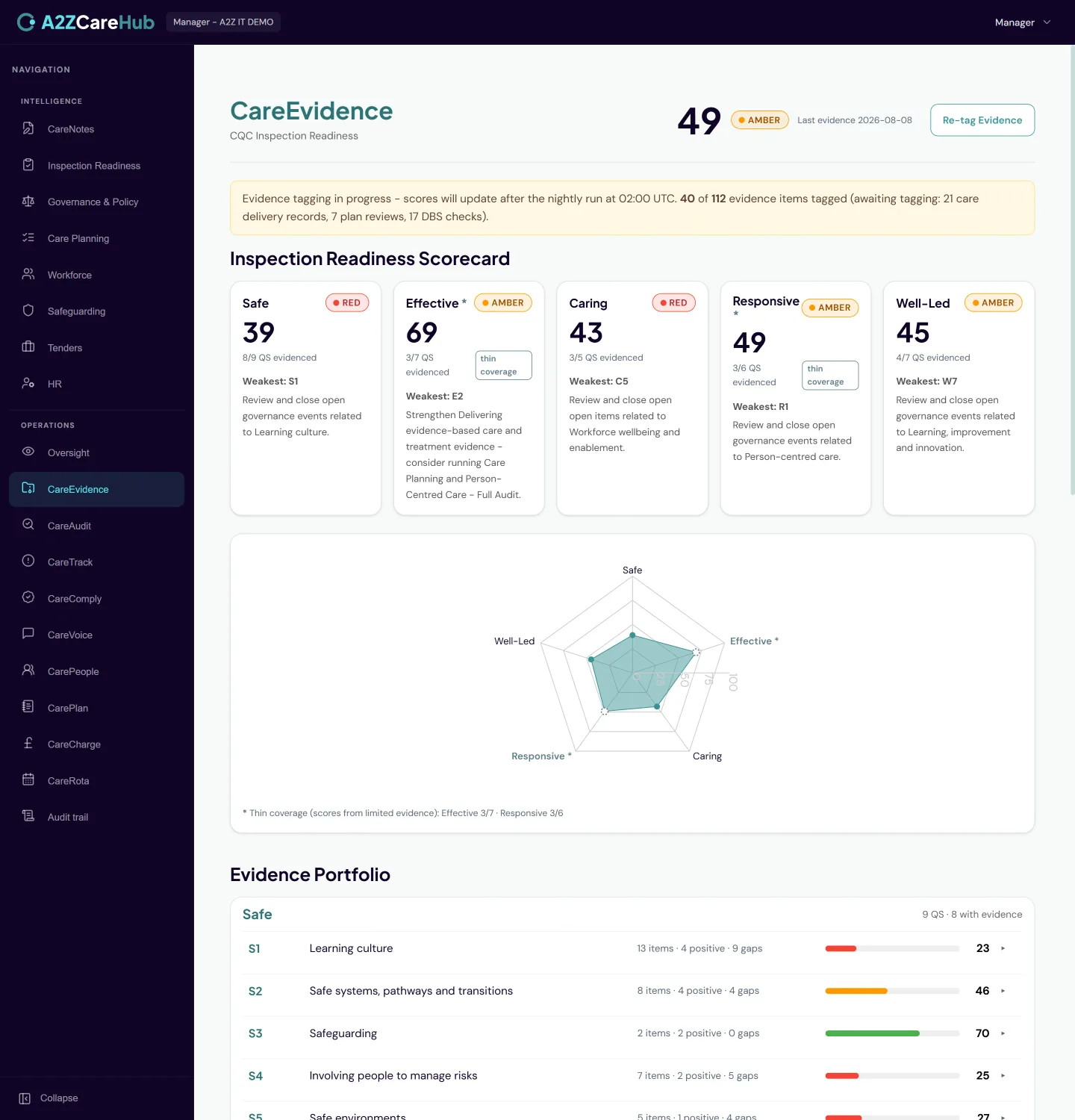
Every piece of evidence across the whole platform, mapped automatically to the 34 Quality Statements inspectors use. Portfolio views per statement and a readiness scorecard that shows where you’re strong and where you’re thin.
What's included
- Automatic AI tagging of evidence to the 34 Quality Statements
- A portfolio view per statement: click through to the underlying evidence
- An evidence-strength scorecard across the five key questions
- Coverage from every module, including care delivery, HR and rotas
- Red, amber and green bands calibrated to reward quality over volume
How it behaves day to day
- Tagging runs overnight with no manual filing. Your team just works; the evidence organises itself
- Gaps count against you honestly: a statement with recurring problems shows weak even if there’s lots of activity
- Before an inspection, the portfolio view answers "show me our evidence for this statement" in one click
Operational systems: four modules
The day-to-day running of the service: care records, people, invoicing and rotas. The systems providers usually buy from three or four separate vendors.
A2Z CarePlan
Care planning and electronic care records
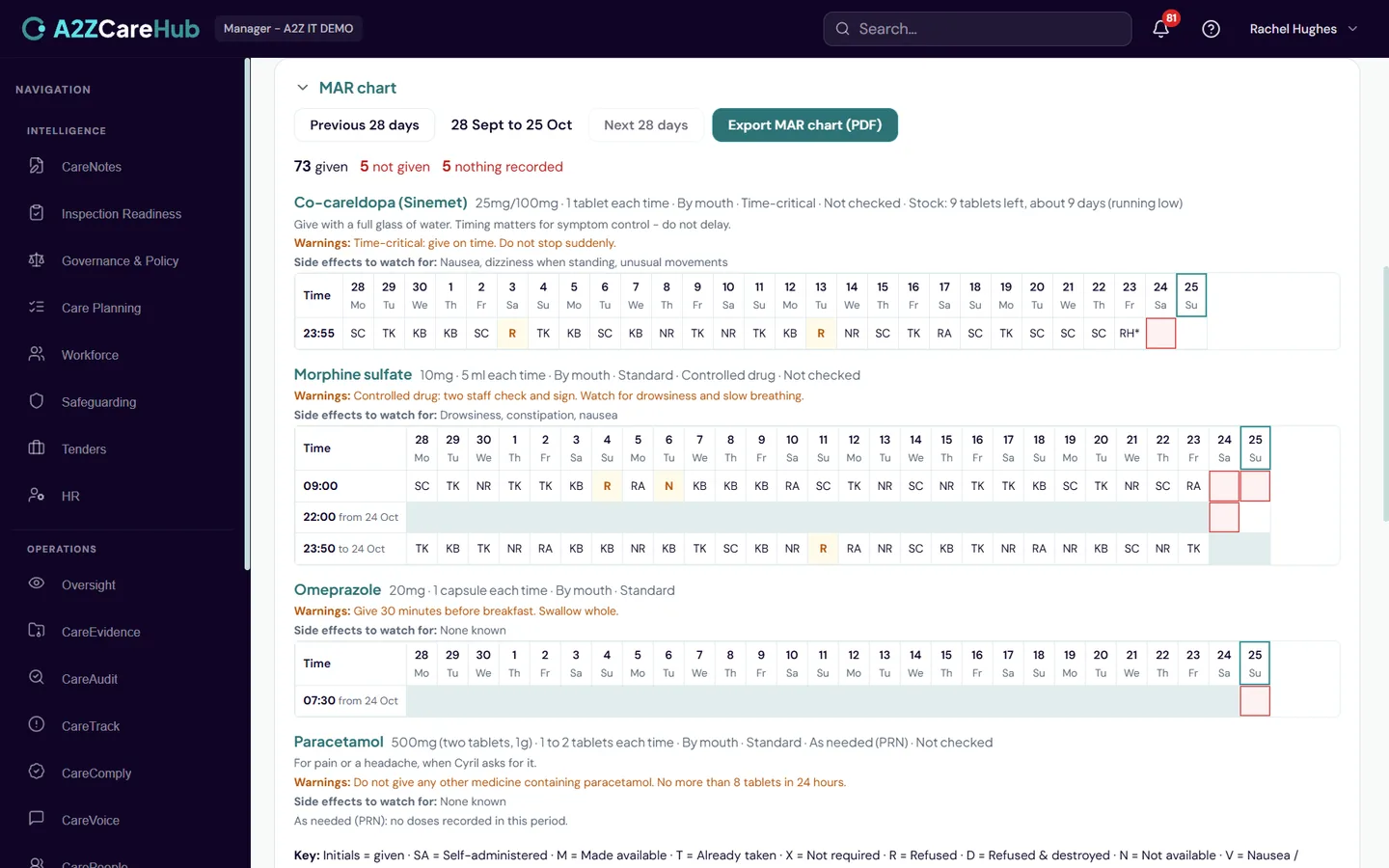
Person-centred care planning and electronic care recording, from first enquiry through assessment, admission, daily delivery and review. MAR charts, visit capture, body maps and clinical risk management on one platform.
What's included
- An intake pipeline from enquiry to admission, with a document checklist per prospect
- A library of over 30 professionally authored assessment and care plan templates, cloneable and editable
- Review cycles per plan, with incidents and events automatically flagging plans for review
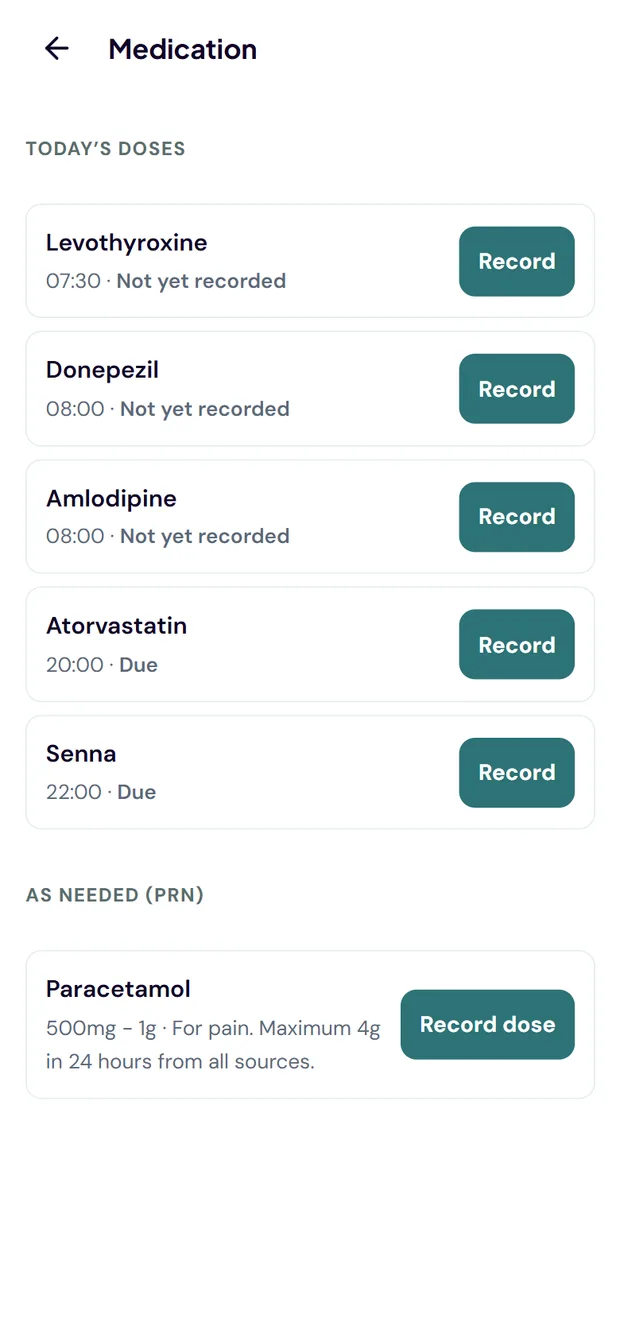
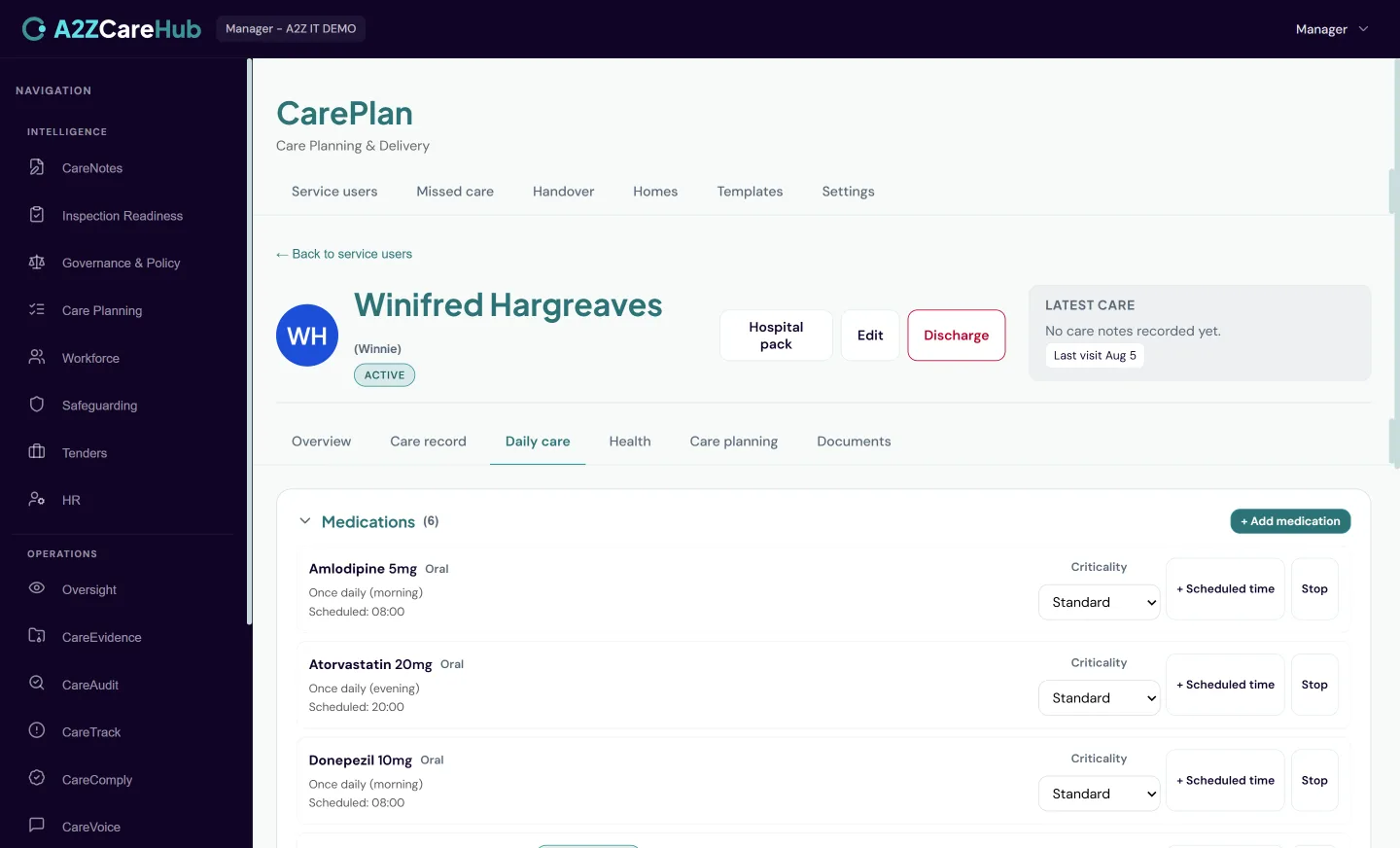
- Electronic MAR with PRN support, controlled drug witnessing and a full audit trail, plus a MAR chart on screen and as a printable PDF
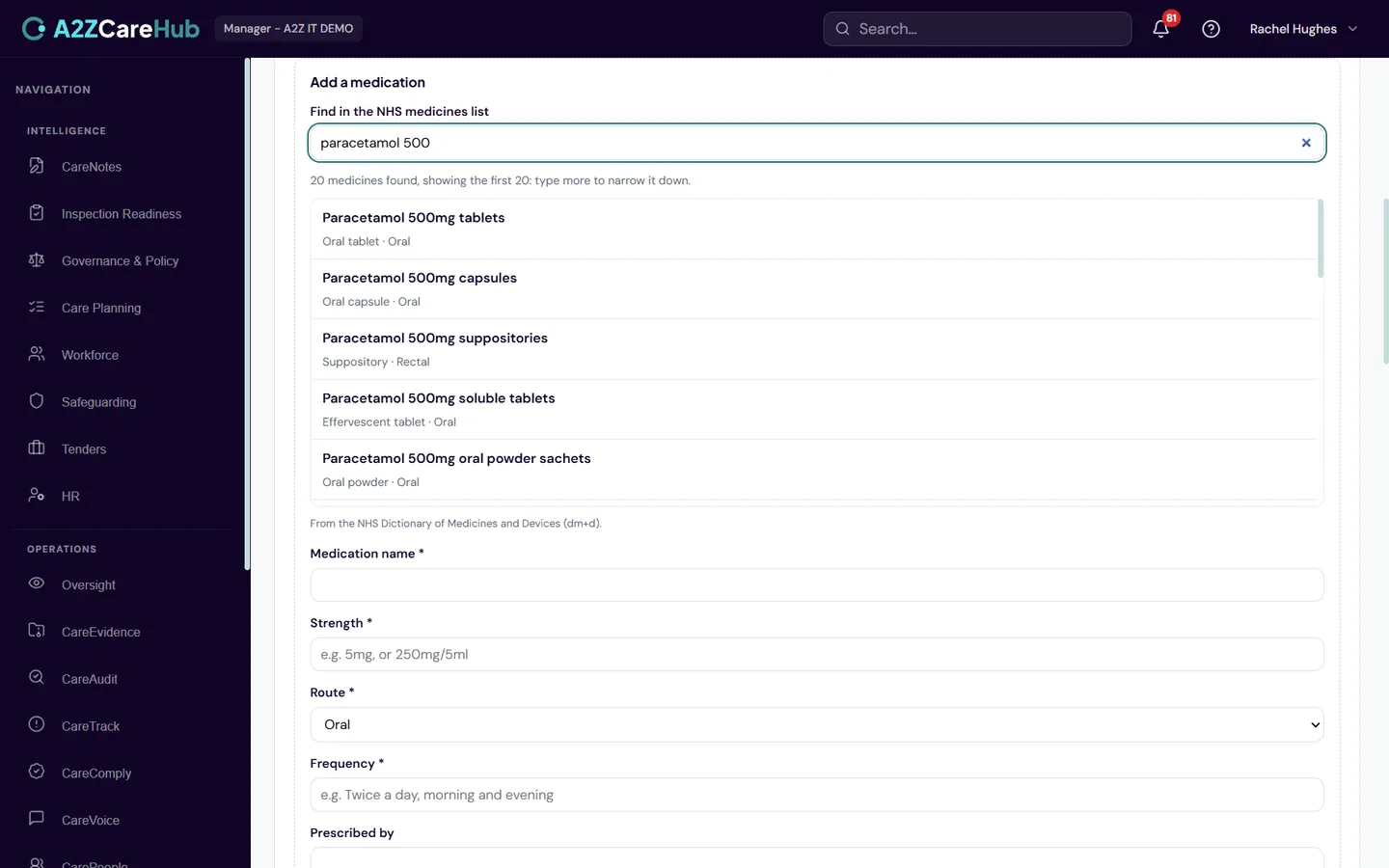
- Medicines picked from the NHS Dictionary of Medicines and Devices (dm+d), which fills in the strength, route and unit, all still editable
- Medicine stock in each medicine's own unit, with a warning before it runs low
- Doses can stay on the pharmacy's paper MAR chart if you prefer, for the whole organisation or one person
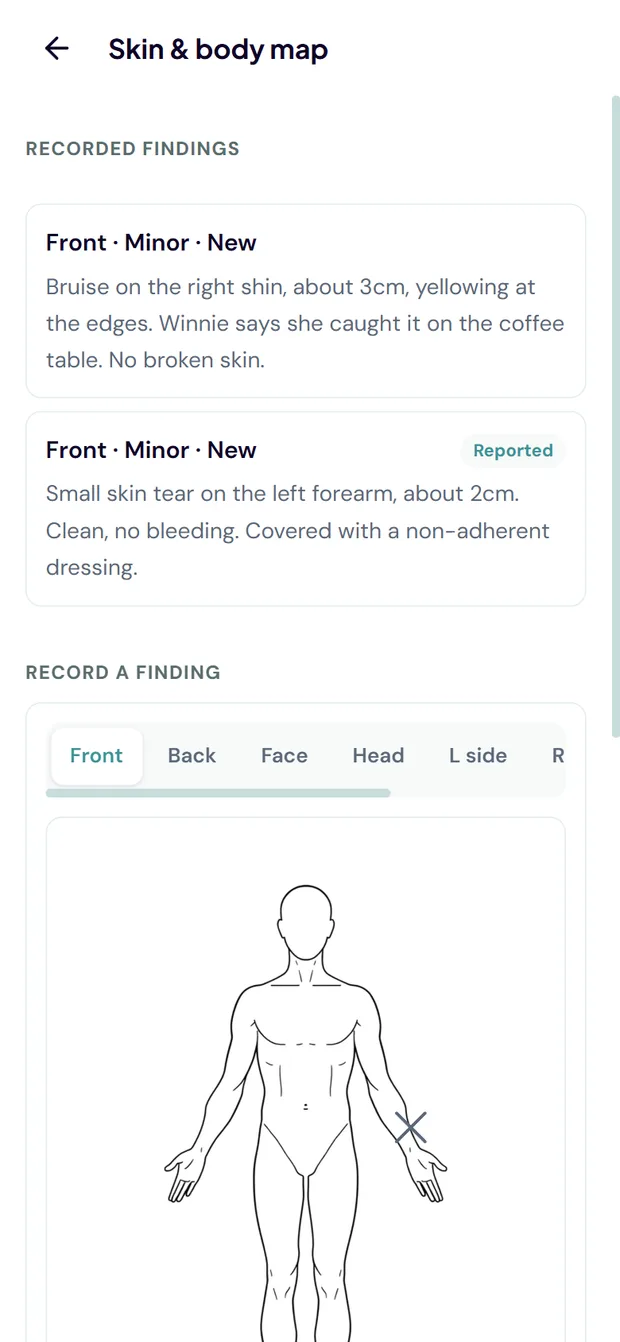
- In-visit capture: mood, measurements against targets, care notes and a visual body map
- Per-visit task lists driven by the care plan, with missed care alerts to managers
- AI-narrated monthly summaries per person and an advisory plan-gap checker
- A one-click emergency hospital pack, structured to the national urgent-transfer standard, ready to print and send with the ambulance
- Personal goals per person, visible to carers at the point of care
- A shift-handover view per resident: everything recorded in the window, in the carers' own words
- At the end of a shift, a recap of what the carer recorded and an AI-drafted handover for the next carer, which the carer edits and approves before it is submitted
- A 90-day trend of skin findings per person, alongside the body map
- Each person's confirmed location shown on a map, so a carer knows where they are going
- PDF export of the care plan and the full care record, ready to hand to an inspector
- Bulk import of service users from a CSV export of your previous system, with on-screen column matching and a row-by-row check before anything is created
- Equipment at each person's home recorded with its inspection dates
How it behaves day to day
- The MAR warns rather than blocks: a late or unusual administration is recorded as reality and flagged, never forced into a workaround
- Medication records are immutable once submitted. Corrections append a new signed entry, so the audit trail is never edited
- Missed doses of time-critical medication alert a manager immediately, not at the end of the day
- A second member of staff checks every new or changed medicine before it is relied on
- Doses not given alert the office: straight away for time-critical medicines, in a short digest otherwise
- Senior carers you trust can manage medicines and record stock from their phone; other carers record doses but cannot change them
- Carers mark findings on a professional body map by touch, at the exact spot, with serious new findings prompting an incident escalation
- Before walking in, a carer sees a continuity briefing: what changed since the last visit, recent mood, anything to watch
- Tasks not done for a reason are captured with that reason. A manager is told once, not nagged repeatedly
- "CQC would expect a plan covering X" prompts appear where a plan is missing. Advice, never a roadblock
- Anyone on shift can generate the hospital pack in an emergency. Gaps print as Not recorded, because on a transfer document what is not known is safety information
- Expected measurements are set per person. A visit completed without the expected reading raises an alert, on the day
- The handover draft is written from what the carer actually recorded on that shift, not invented. The unedited draft is kept alongside the approved version, so what the assistant wrote and what the carer signed off are both on the record
- If the assistant is unavailable, the carer writes the handover themselves. A handover is never blocked
- Where a location is taken from the recorded address rather than confirmed by a manager, the map says so on its face
A2Z CarePeople
HR built for care providers
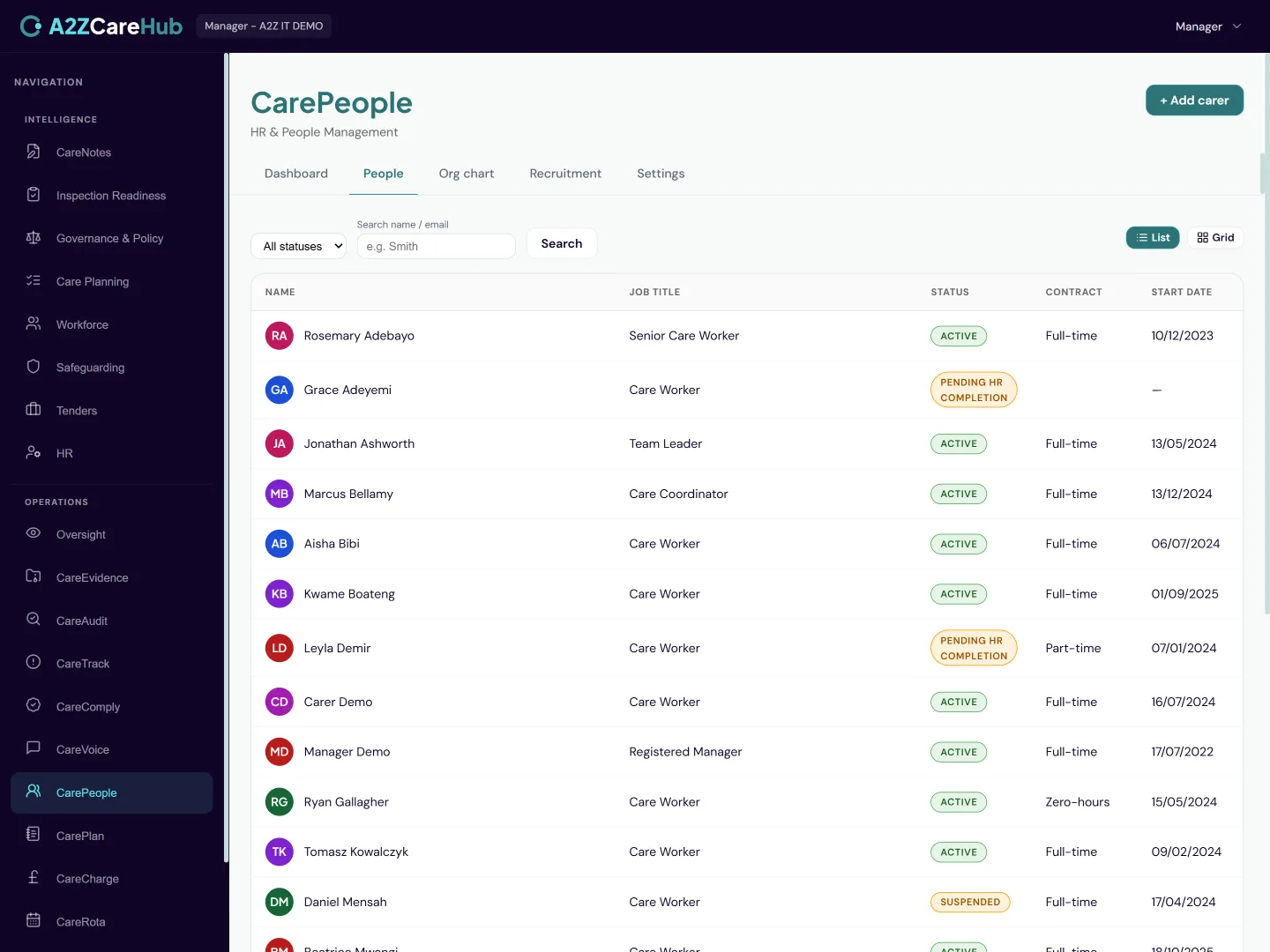
The full staff record: recruitment through onboarding, documents and DBS tracking, leave, supervisions and appraisals, an organisation chart and the sensitive HR records every provider eventually needs.
What's included
- A recruitment pipeline: applicants, interviews, offers with built-in e-signature, one-click hire to a staff record
- Employee records with documents, right-to-work and DBS tracking with expiry warnings
- Leave requests and approvals with live balances, from the carer’s own phone
- Approved leave arrives as a standard calendar invitation, so it lands in the employee’s own calendar alongside everything else in their week
- An optional shared team calendar in Outlook, showing who is away across the whole service, for organisations on Microsoft 365
- Supervisions, appraisals, goals and performance plans with a proper lifecycle
- Attach your own paperwork to a supervision, appraisal, goal or performance plan, so the forms your service already uses keep working
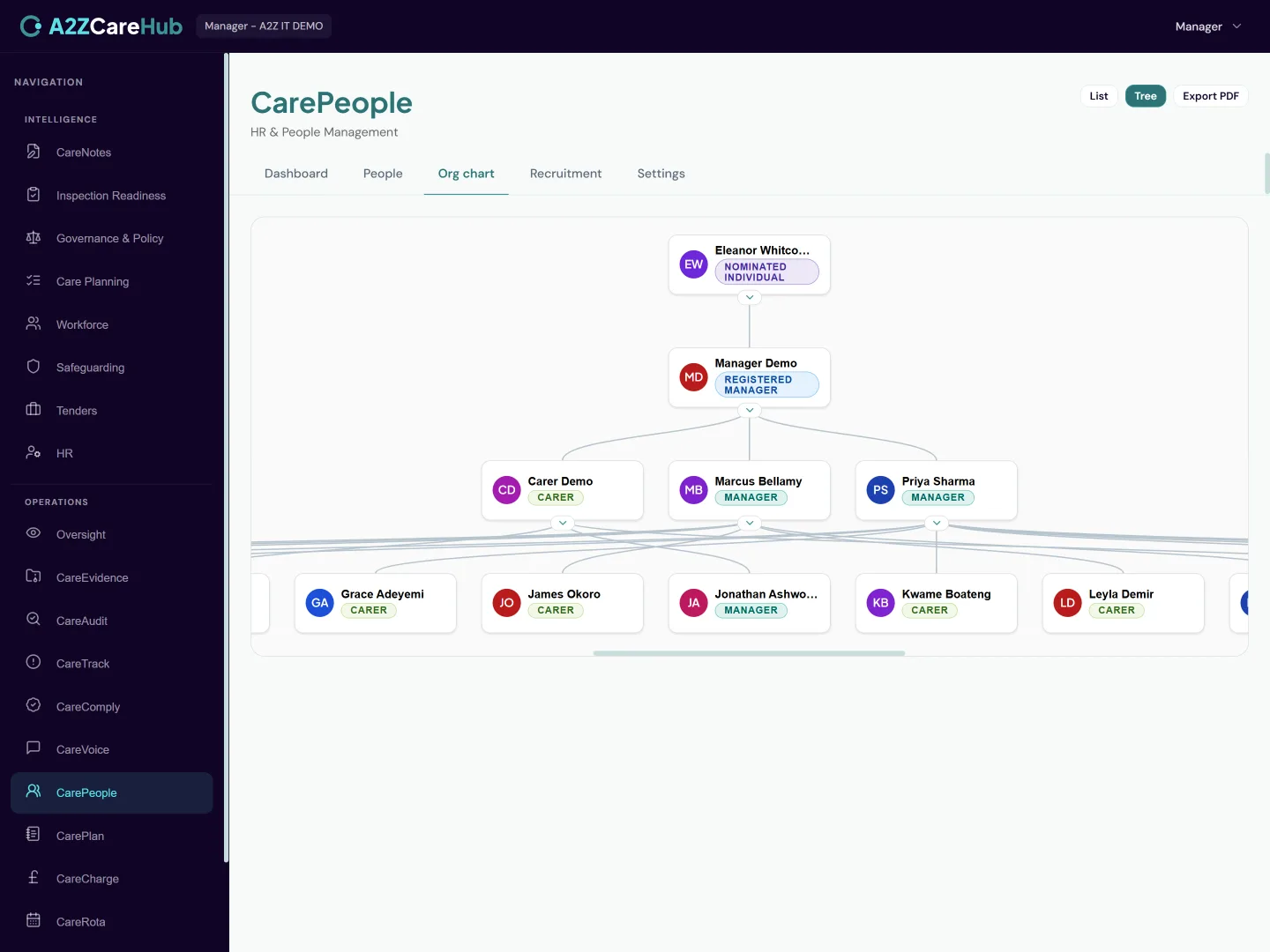
- An organisation chart with reporting lines, exportable to PDF
- Payslip distribution straight to each carer’s Teams
- Carers see the hours recorded against their shifts alongside their payslips
- Carers upload their own documents from their phone: photo ID, proof of address and right-to-work
- Reference tracking for each referee, from recorded to requested to received or declined, against an applicant or an existing employee
- Exit interviews with structured reasons for leaving and the themes worth acting on, plus a leaver checklist covering equipment, final pay and handover
- Optional Bradford Factor scoring on sickness absence, off unless you switch it on
- Disciplinary and grievance records following the ACAS process
- A dashboard of compliance tiles: DBS, supervisions, documents, with CSV export
- Bulk import of staff from a CSV export of your previous system. Incomplete records arrive as drafts for HR to finish, never as a blocker
How it behaves day to day
- A carer requests leave in Teams; it routes to their actual supervisor from the org chart and the decision comes back as a notification
- Offer letters go out for e-signature and come back signed without printing anything. Hiring converts the applicant to a staff record in one step
- Sensitive records are properly walled: a grievance about a manager is invisible to that manager. Staff never see investigation files about themselves
- The dashboard leads with what’s expiring: DBS renewals and overdue supervisions surface before they become findings
- For Microsoft 365 organisations, staff work accounts can be created, licensed, suspended and offboarded right from the HR record
- Where the office has not entered an actual time yet, a carer’s hours say exactly that rather than showing zero, because presenting a missing record as nothing worked is worse than saying it is not in yet
- DBS certificates and signed contracts stay office-recorded: a carer uploads their own identity documents, but the records that feed compliance dashboards are entered by someone who has physically seen them
- References are tracked, never sent for you. You contact the referee and CareHub records who, when and what came back, so a half-finished reference is visible instead of forgotten
- Where Bradford Factor scoring is switched on it shows the score with its working and nothing else. Trigger points are your policy, so the platform never sets one or flags a score as a problem
- Every leaver checklist tick records who did it and when, and exit interview contents stay with HR: a read-only reviewer sees that one was held and on what date, never why someone left
A2Z CareCharge
Invoicing and revenue assurance
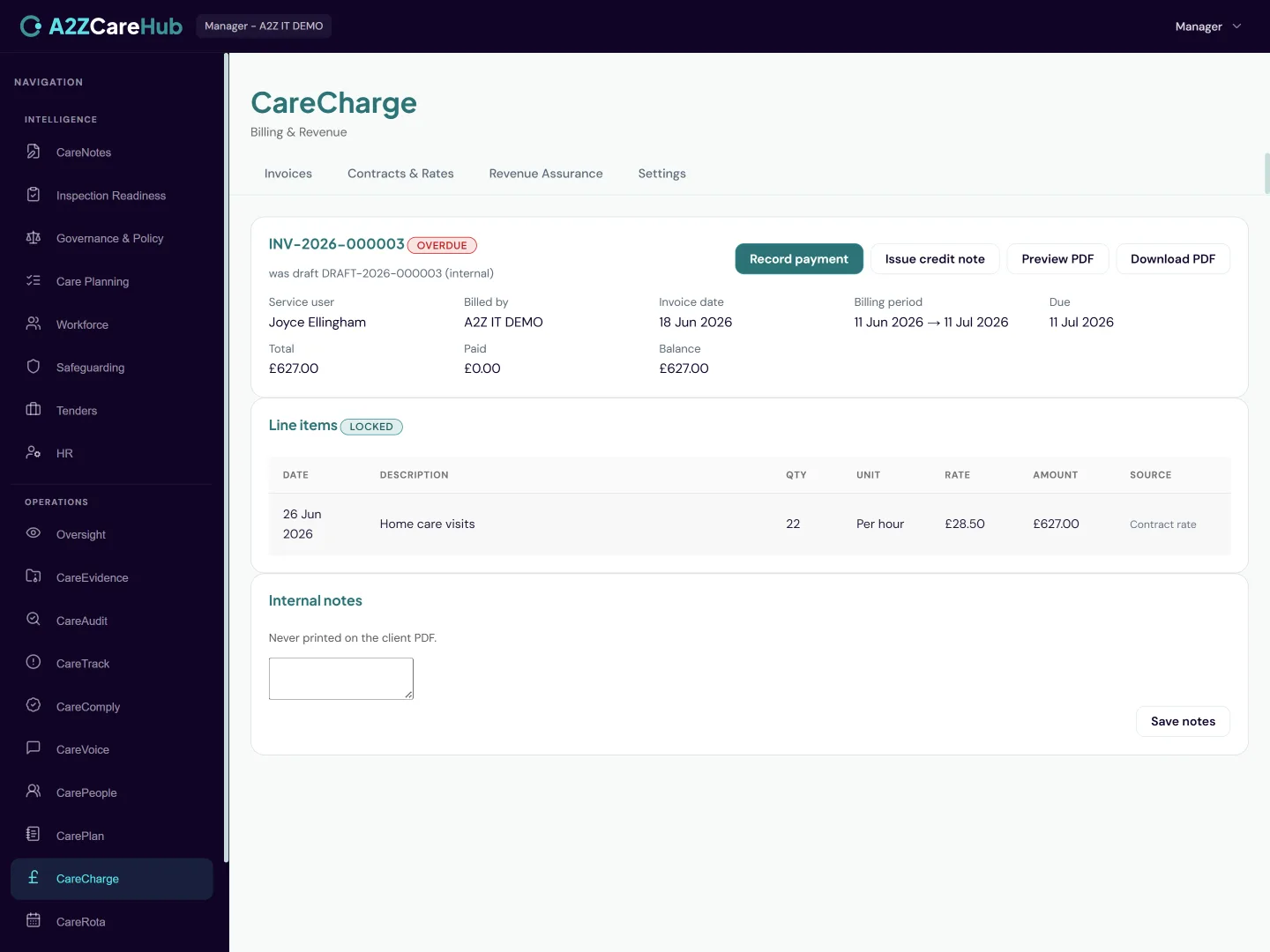
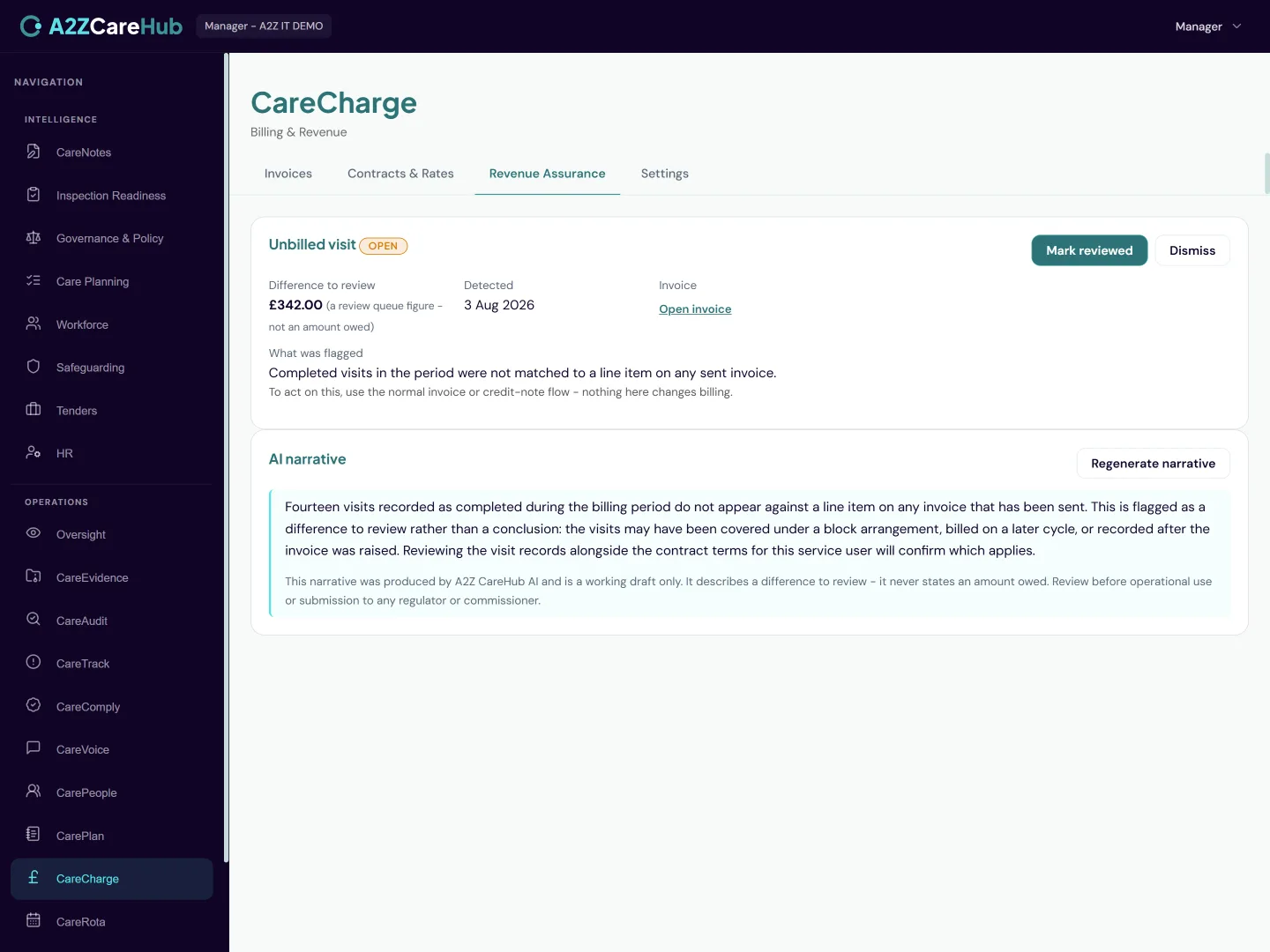
Provider invoicing built on your actual delivered care: contracts and rates, invoices generated from completed visits, credit notes, payments and an AI revenue assurance sweep that finds the money you’re missing.
What's included
- Contracts and rate cards per client, with weekday, weekend and bank holiday variants
- Invoices generated from completed visits, with a full preview before anything is committed
- Sequential, tamper-evident invoice numbering and locked invoices once sent
- Partial credit notes, multiple payments and automatic overdue chasing
- Branded PDF invoices with your logo and bank transfer details
- An AI revenue assurance sweep: underfunded placements, missed rate uplifts, unbilled visits, duplicates
How it behaves day to day
- Rate conflicts are blocked at entry: two overlapping rates for the same period can’t both exist, so ambiguous pricing never reaches an invoice
- The generate step shows exactly which visits will be billed and lets you exclude any before committing. Nothing is invoiced silently
- Bank holidays are pre-loaded years ahead, so holiday-rate billing needs no manual list-keeping
- Revenue findings are flagged as "a difference to review", with the deterministic numbers shown. The AI narrates; it never invents amounts
- Managers are notified the moment the sweep raises a new finding, with a link straight to it
A2Z CareRota
Rostering built for care
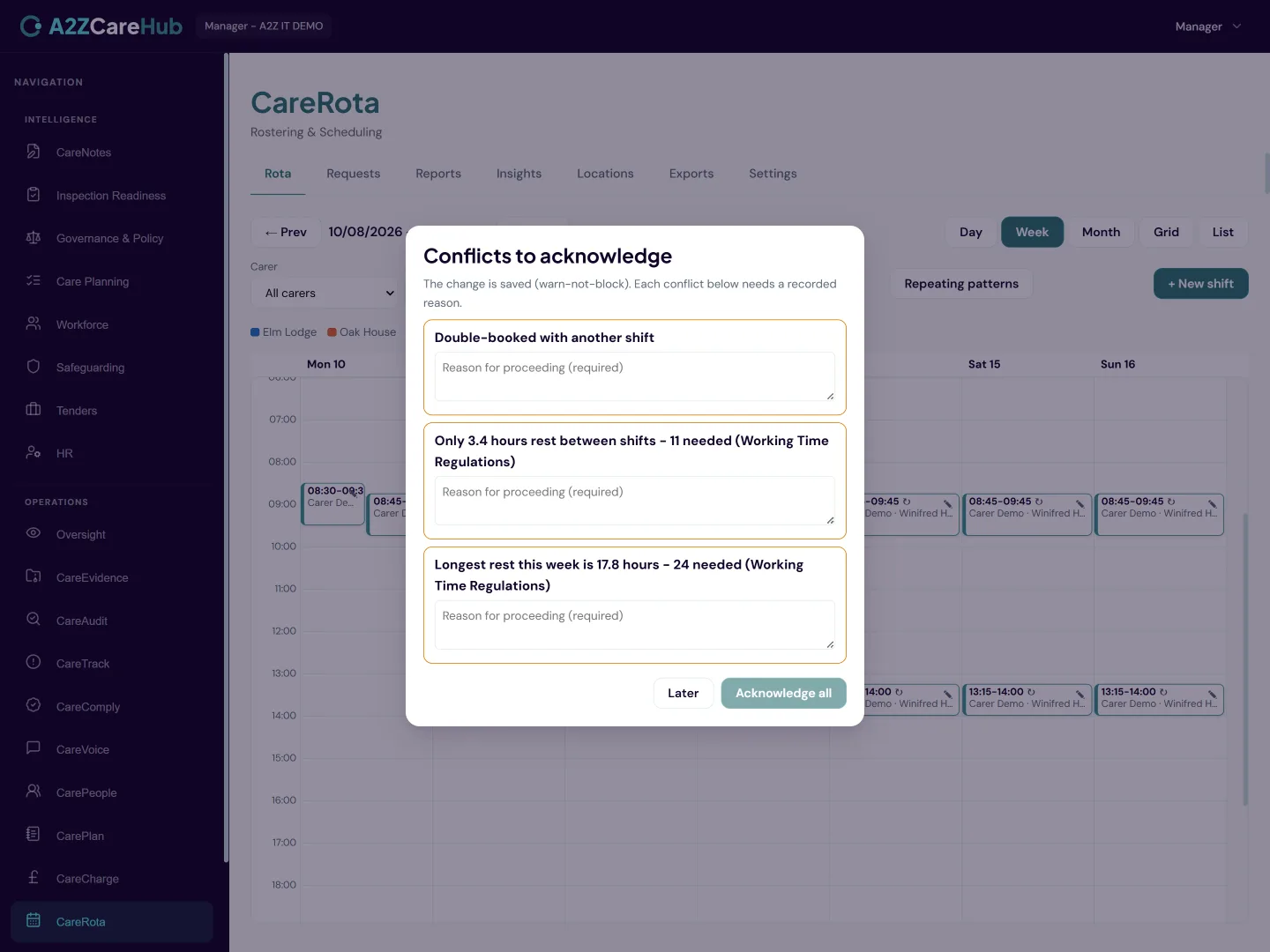
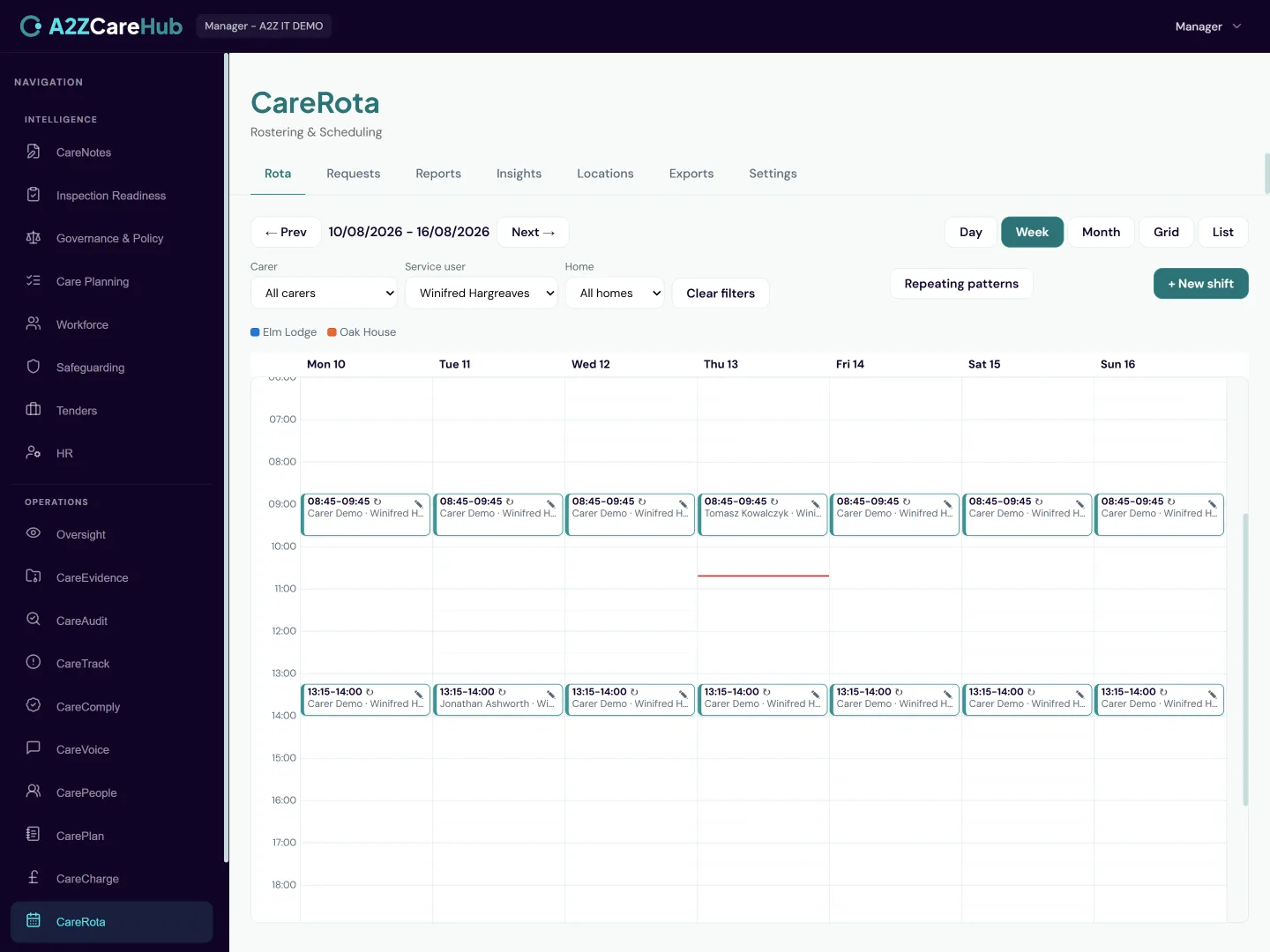
Drag-and-drop scheduling with a conflict engine that actually explains itself, recurring shift patterns, swap and cover requests, geo check-in for domiciliary visits and payroll-ready hours exports.
What's included
- A drag-and-drop rota across carers and days, plus a list view
- A conflict engine checking double-booking, working time rules, rest and more as you schedule
- Carer availability patterns and one-off exceptions the rota checks against
- A who-can-cover-this picker that ranks every carer for a shift and explains its reasons
- Competency-matched allocation: requirements per person, with lapsed competencies excluded automatically
- Multiple homes on one rota, colour-coded per home, with staff shared across homes
- Recurring weekly patterns with proper series editing, like Outlook
- Swap and cover requests with manager approval
- Geo check-in and check-out for domiciliary visits
- A confirmed location per person, pinned by a manager and shown on a map
- Hours exports formatted for Sage, Xero, QuickBooks and more
- Nightly rota intelligence: an AI that flags patterns worth a look
- Completed hours flow straight into CareCharge invoicing
How it behaves day to day
- Warnings state their actual values: "requires 2 carers, but 1 is scheduled" or "scheduled 52 hours this week, the limit is 48". Never a vague red flag
- The cover picker hides nobody: carers it would not suggest are listed with their reasons, so why someone was not offered a shift is always answerable
- Serious conflicts require a manager to acknowledge with a reason, which is kept as an audit record. Routine ones advise without interrupting
- Geo check-in flags rather than blocks: a check-in away from the expected location is recorded and queued for next-day review. The carer is never locked out of starting care
- Unanswered swap requests expire themselves instead of hanging around forever
- Payroll exports use each vendor’s real import format, honestly labelled, so month-end is a download rather than a retyping session
Works with what you've got
Ready for a proper look?
Start a free 30-day trial, or get in touch and we'll walk you through the parts that matter to your service. You don't need to rip anything out either: CareHub runs alongside your current system while your team adopts it.
Start your free trial